Updated
Connecting Agoda to Nowistay keeps your Agoda calendar, prices and restrictions in sync with your other platforms, and brings your Agoda bookings into the same calendar as Airbnb, Booking.com, Vrbo and Expedia.
Once connected, Nowistay syncs the following with Agoda:
The amount shown on an Agoda booking in Nowistay is what the guest paid, Agoda’s commission included, so Agoda bookings compare directly with your other platforms.
Agoda does not open its guest messaging to connected software. This means:
Agoda does not pass the guest’s own email address or phone number to connected software: the reservation comes with an Agoda email address for the guest, and no phone number. Your automated messages go by email to that Agoda address, and when the guest replies, the reply lands in the booking’s conversation in Nowistay and the AI co-host answers. To also reach the guest on WhatsApp, add their number to the booking: open it in Bookings, click the pencil (Edit) next to the guest details and fill in Phone with the international prefix. If the guest writes their number in a reply, the AI co-host saves it on the booking for you. Details in Automate guest communication for Agoda bookings below.
Agoda only accepts prices and availability from the channel manager selected for the property. Do this once per Agoda property:
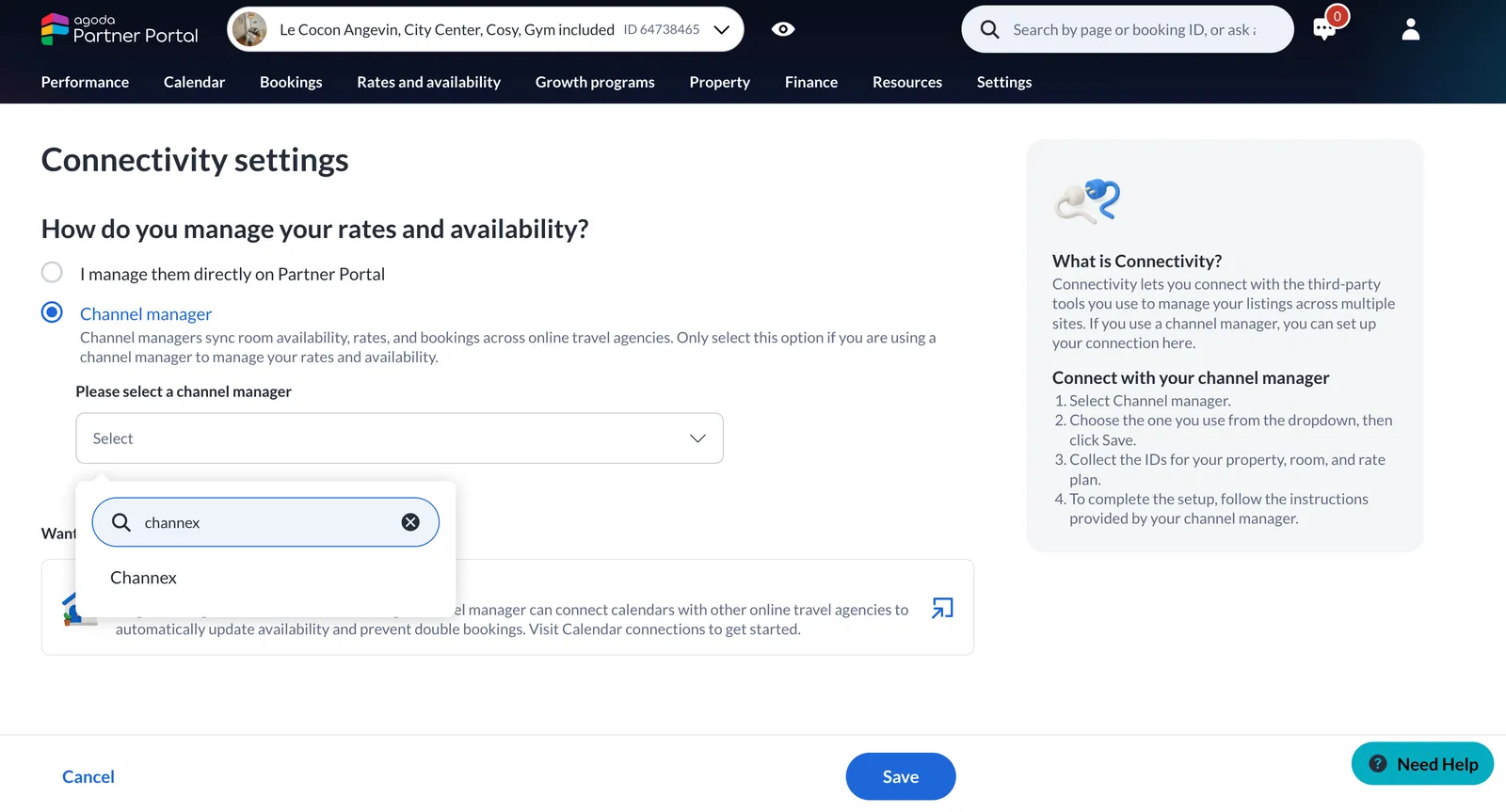
Channex is the connection Nowistay uses with Agoda, so it is the name to select in Agoda’s list. If it doesn’t appear, ask Agoda support with the Need Help button.
You also need your Agoda property ID: it is the number after ID, next to your property name at the top of the Partner Portal. You don’t need the room and rate plan IDs Agoda mentions on this page: Nowistay reads your room types for you.
From your Properties page, click the ”…” menu on the property card, then “Synchronization”.
In the drawer that opens, click “Add a booking platform (OTA)”. In the “Connect a booking platform (OTA)” dialog, open “OTA Platform”, select “Agoda” and click “Next”.
If Agoda is the first platform you connect to this property, Nowistay first asks you to confirm the nightly rate it will send.
[Screenshot needed: Connect a booking platform dialog with Agoda selected]
In the “Connect Agoda” dialog, enter the number in “Agoda property ID” and click “Next”.
[Screenshot needed: Connect Agoda dialog with the property ID field]
You’ll see “OTA connected successfully!” and Agoda appears in the Synchronization drawer with the status “Active”. Nowistay sends your calendar, prices and restrictions to Agoda right away: check them in the Partner Portal a few minutes later.
If one Agoda property holds several of your units (one room type per unit), connect each Nowistay property with the same Agoda property ID:
Agoda does not send Nowistay the reservations made before you connect. After connecting, compare your Nowistay calendar with your Agoda reservations and add each missing one as a manual booking. Then click “Edit” on that booking and enter the Agoda booking ID in “Booking number”: if the guest later changes or cancels the reservation on Agoda, Nowistay updates your booking instead of adding it a second time.
All bookings, changes and cancellations made on Agoda after you connect sync automatically.
If you see “Could not reach this Agoda property. Check the property ID and that “Channex” is selected as channel manager in the Agoda Partner Portal.”, check that:
In the Synchronization drawer, click “Disconnect” on the Agoda line. Agoda stops receiving updates from Nowistay, and the bookings already in Nowistay stay. Connecting again later with the same property ID restores the connection.
In Automations, open a guest message template, then “Advanced options”. In “Apply to bookings from”, select “Agoda” to send that template to Agoda bookings only, or combine it with other platforms. Agoda guests receive these messages by email or WhatsApp, never in the Agoda chat: keep that in mind in the wording.
See How to set up automated guest emails for the template settings.
With the WhatsApp channel connected, choose WhatsApp in the template’s “Send via” setting. The message still goes by email, and also on WhatsApp once the guest’s number is on the booking (added by you, or saved by the AI co-host when the guest writes it in a reply). The guest replies from their phone, and the AI co-host answers in the same Nowistay conversation. You or your team can step in at any time.
Guides for hosts: read the blog.
Ready to Put Your Rental on Autopilot?
