Every Nowistay website has three legal pages: a legal notice, a privacy policy and booking terms. Nowistay fills in the facts it knows at the top of each page, in every language of your site, and you write the rest in the editor before you can publish. This article shows what to fill in, where, and what to check for your country.
This article is general information, not legal advice. Rules change: check with your local authority or a professional.
Why the legal pages are yours
Your website is yours: you decide what it shows and you sell your stays on it. That makes you its publisher, so its legal pages are your responsibility. Nowistay hosts the site and fills in the factual parts: who publishes it, who hosts it, who sells each stay and how payment works. You accepted this when you created the website (see the Nowistay Sites terms).
The three legal pages on your site
| In the editor | In your site’s footer | What it is for |
|---|
| Legal notice | “Legal notice” | Who publishes the site, who hosts it, who sells each stay |
| Privacy policy | “Privacy” | What you do with your guests’ personal data |
| Booking terms | “Booking terms” | How booking, payment, cancellation and house rules work |
Visitors find the three links at the bottom of every page, next to ”©” and your name, in each language of your site (for example /legal-notice in English, /mentions-legales in French). Search engines don’t list these pages.
What Nowistay fills in for you
At the top of each legal page, Nowistay adds a block of facts in every language of your site. You can’t edit it directly: change the information at its source, and it reaches your live site at your next publish.
| What visitors see | Where it comes from |
|---|
| Publisher: your name or company name, with your legal form, address, registration number, VAT number and share capital if filled in | Legal pages > Who publishes the site |
| Contact: your e-mail and phone | Site settings > Public contact (Contact e-mail, Phone (optional)) |
| Hosting provider: Nowistay SAS, its address in Bordeaux, company number and e-mail | Always the same |
| Seller of the stays, one line per property (legal notice and booking terms) | The owner set in the property’s Property infos when Issue invoices in the owner’s name is on, otherwise you |
| Payment by card through Stripe, with the total price, fees and payment schedule shown before paying (booking terms) | Always the same |
| Privacy: you publish the site, Nowistay hosts it without advertising cookies or trackers, Nowistay and Stripe handle bookings and payments on your behalf | Always the same, with your name |
If you manage properties for their owners, see how to issue invoices in the owner’s name.
What you write yourself
- Open Website in the menu, then your website, to open the editor.
- Click the three-dot button (More) in the editor bar, then Legal pages.
- Under Who publishes the site, fill in Name or company name (the only required field). Add Legal form, Address, Registration number, VAT number and Share capital if they apply to you. This Registration number is your business registration, for example a trade register number. The tourist rental number of a property goes elsewhere (see below).
- Under Your text on each page, write your Legal notice, Privacy policy and Booking terms. If your site has several languages, choose the language with the switch (EN, FR…) above the pages.
Everything saves by itself.
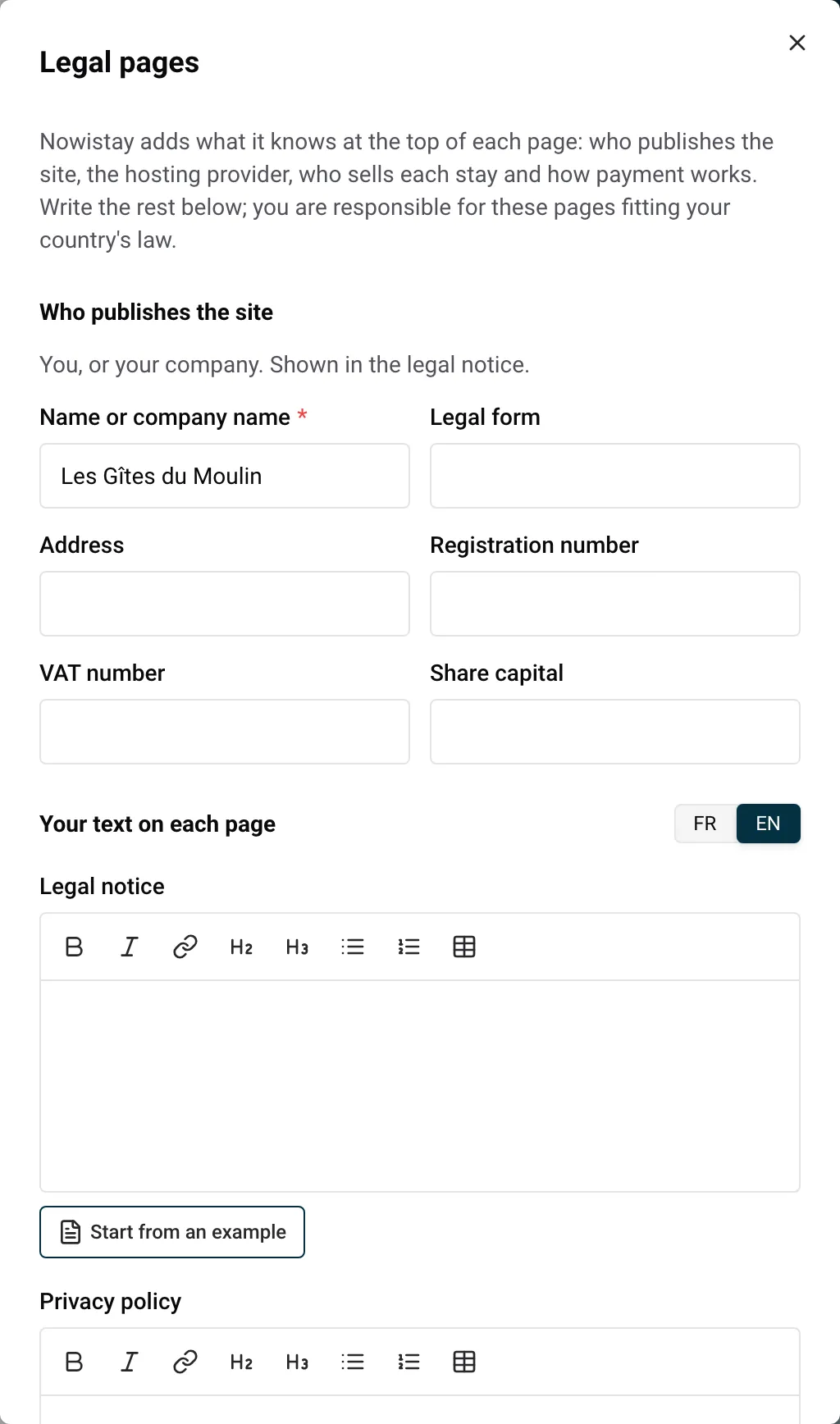
Start from an example
When a page is empty and the selected language is English or French, a Start from an example button appears under it. It fills the page with a text to adapt: for the booking terms, for example, booking confirmation, prices, arrival and departure, cancellation, house rules and disputes.
Each example starts with “Example text to adapt to your situation, not legal advice.” Read every line, change what doesn’t match how you work, then delete that first line. Other languages have no example: write those pages yourself.
Replace every [TO COMPLETE] marker
The examples contain markers such as [TO COMPLETE: your cancellation and refund terms]. Replace each one with your own text, or delete the line if it doesn’t apply to you. As long as one marker is left anywhere on your site, legal pages included, you can’t publish. The French example has one more marker, for the consumer mediator: complete it or delete it in the same way.
Your main language comes first
The three pages need your text in your site’s main language. Other languages are up to you: until you write a page in a language, visitors in that language see Nowistay’s facts in their language, then your main-language text.
The AI never writes or changes legal texts. The first version of your site leaves them empty, the AI chat can’t edit them, and adding a language doesn’t translate them. The same goes for Who publishes the site and your Public contact.
What blocks publishing
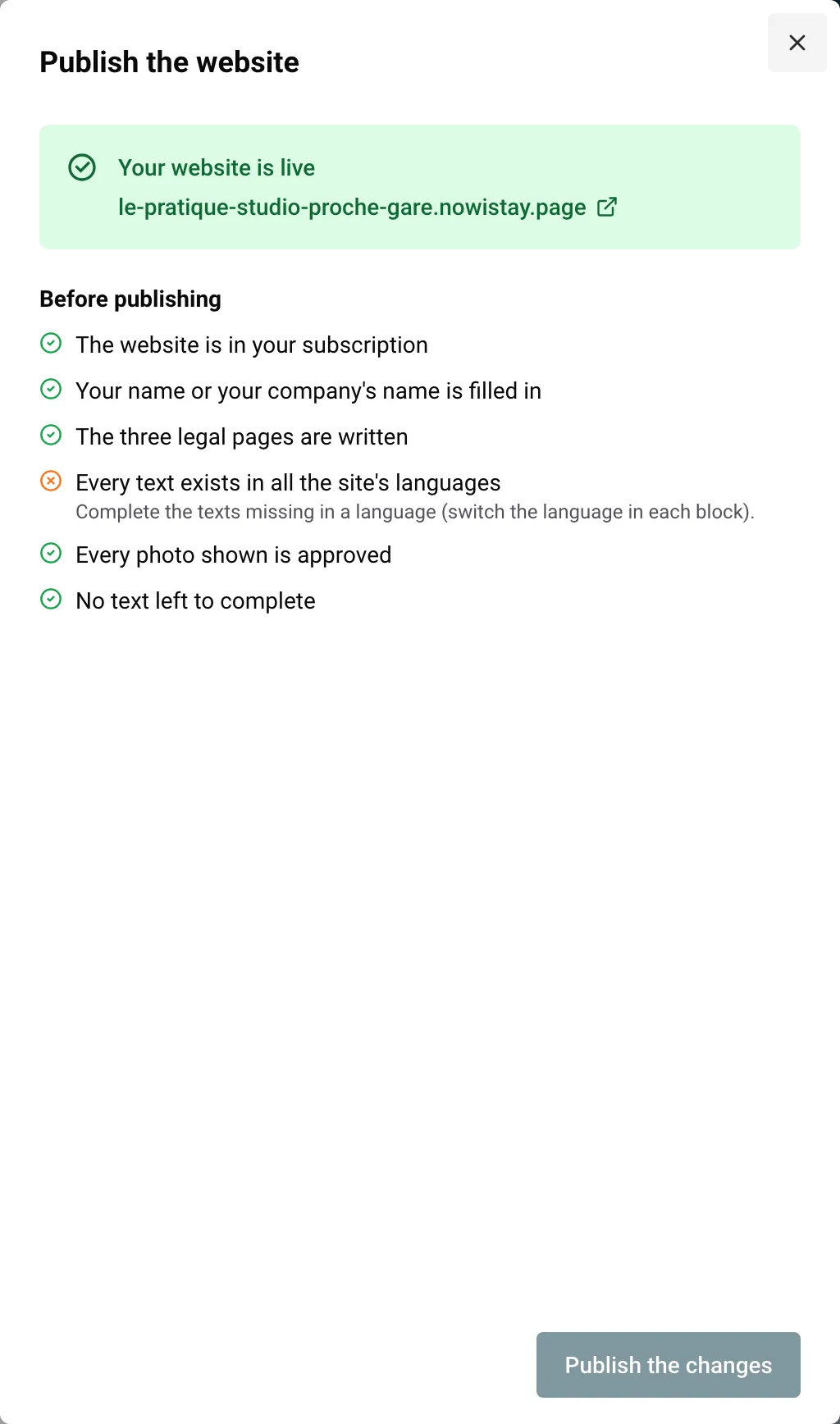
When you click Publish, the Publish the website panel lists the checks under Before publishing. Three of them concern the legal pages:
- Your name or your company’s name is filled in
- The three legal pages are written (at least in the main language)
- No text left to complete (no [TO COMPLETE] marker anywhere)
Open next to the first two takes you to Legal pages. Once every check passes, the panel shows: “By publishing, you confirm that your legal pages comply with the law of your country and that you have the right to use these photos on your site.” You give this confirmation at every publish, and Nowistay records it.
Nowistay doesn’t check what your pages say or your registration numbers: that part is yours. Once your site is online, your changes reach visitors when you click Publish the changes (see Publish your website).
The registration number of each property
Many countries and cities ask for a tourist rental registration number on offers, sometimes your own website included (see the checklist below). In Nowistay it belongs to the property:
- Go to Properties and click More actions (the three dots) on the property’s card.
- Click Listing details.
- Fill in Registration number.
The number shows on that property’s page, in the facts at the top (guests, bedrooms, beds…). It doesn’t show on the home page, on property cards or in the legal notice. If you imported the property from Airbnb, Nowistay may have copied the number from your listing: check it. An empty number doesn’t block publishing, so check each property yourself. If your site is online, the change appears on it by itself within about an hour.
Cookies and statistics
- The pages of your website set no cookies and show no cookie banner.
- Statistics counts visits to your live site without cookies (see Website statistics). You can’t add Google Analytics or an advertising pixel.
- The booking form and the contact form inside your pages come from Nowistay’s booking pages, which remember the visitor’s language with one language cookie. Payment happens on Stripe’s secure payment page.
If your privacy policy talks about cookies, these are the facts to describe.
Country checklist
The main points to check for each country, with links to official sources (checked in October 2026). These lists are not complete and rules change.
All EU countries
- Privacy notice (GDPR): who you are, why you use the data and on what legal basis, how long you keep it, who receives it, any transfer outside the EU, guests’ rights and their right to complain to the data protection authority. European Commission
- Withdrawal: a stay booked for set dates has no 14-day withdrawal right, but before booking, guests must see your identity, address, phone and the total price with taxes and charges. Your Europe
- No EU dispute platform link: the EU online dispute resolution platform closed on 20 July 2025. Remove any link to it. European Commission
France
- Mentions légales (LCEN, art. 1-1): name, address, e-mail and phone; RCS or RNE number and VAT number if you have them; “EI” after your name if you are an entrepreneur individuel; legal form, share capital and registered office for a company. Legifrance, Service-public
- Registration number: every meublé de tourisme needs a declaration number, and every offer, your website included, must show it. The offer must also say whether you rent as a private individual or a professional. Code du tourisme
- Cookies: advertising trackers need prior consent, and refusing must be as easy as accepting. CNIL
- Consumer mediator: a professional selling to consumers names their mediator (name, address, website) on the site and in the terms. Service-public
Spain
- Legal notice (LSSI, art. 10): name, address, e-mail, NIF, register details, and prices that state taxes and costs. BOE
- Registration number: rulings of the Supreme Court (May and June 2026) annulled the national single register’s registration rules, including the duty to show that number in listings. Regional tourist registration numbers still apply: check your Comunidad Autónoma’s rules. Ruling, Royal Decree 1312/2024
- Cookies: information and consent. AEPD guide
- Disputes: if you joined or must use an accredited dispute resolution body, name it with its website on your site and in your terms. Ley 7/2017
Germany
- Impressum (§ 5 DDG): name, address, e-mail, register and number, VAT ID; for a company, legal form, representatives and capital. Gesetze im Internet
- Registration number: set by your city. In Berlin, the number must be shown clearly in every public offer. Berlin
- Cookies (§ 25 TDDDG): consent, unless strictly necessary for a service the visitor asked for. Gesetze im Internet
- Consumer disputes (§ 36 VSBG): say whether you are willing or obliged to take part in consumer dispute resolution, and name the body if obliged. Gesetze im Internet
Italy
- Legal notice (D.Lgs. 70/2003, art. 7): name, address, e-mail, register number, partita IVA, and prices with taxes and extras. Normattiva
- CIN: show it in every ad, wherever it is published, so on your website too. Normattiva, Ministry of Tourism
- Cookies: consent for non-technical cookies. Garante
- Disputes: if you committed to a dispute resolution body, name it with its website on your site and in your terms. Normattiva
Netherlands
- Business details: name registered with the KVK, address, e-mail, phone, KVK number, btw-id, how you handle complaints and whether you belong to a geschillencommissie. Ondernemersplein
- Registration number: where your municipality has one, every tourist rental offer must state it. Huisvestingswet 2014
- Cookies: consent before tracking cookies; necessary cookies and low-impact analytics need none but must be disclosed. Ondernemersplein
Portugal
- Legal notice (DL 7/2004, art. 10): name, address, e-mail, register details and NIF. PGDL
- AL number: your advertising, your website included, shows the name or logo and the registration number of the alojamento local. Diário da República
- Cookies: consent where required, for example for analytics cookies. CNPD
- Disputes and complaints: name the dispute resolution entities you are bound to, with their website, and show access to the Livro de Reclamações Eletrónico visibly on your site. Lei 144/2015, Turismo de Portugal
Belgium
- Legal notice: name, address, e-mail, company number (BCE/KBO), VAT number, and a phone number when guests can book on the site. SPF Economie
- Registration: regional. In Brussels, ads state the registration number and contact details. In Flanders and Wallonia, you register with Toerisme Vlaanderen or Tourisme Wallonie. Brussels, Flanders, Wallonia
- Cookies: no cookie that isn’t strictly necessary before consent. APD/GBA
- Disputes: if you must use or committed to a dispute resolution body, name it with its website on your site and in your terms. Code of Economic Law
United Kingdom
- Business details: name, address, e-mail, register number and VAT number; limited companies also show their registered number and office. Legislation.gov.uk, GOV.UK
- Licence or registration: in Scotland, show your licence number (and EPC rating where required) on any listing or advert, your website included. England expects a registration scheme from March 2027; in Wales, register with the Welsh Revenue Authority by 31 March 2027. Scotland, England, Wales
- Privacy and cookies: privacy information when you collect the data; cookie consent, with a few exceptions. ICO privacy, ICO cookies
- Disputes: if you must take part in a dispute resolution scheme, tell the guest about it when you answer a complaint. DMCC Act 2024
Example: two cottages in France
You rent two cottages in the Dordogne as an entrepreneur individuel, on a French and English website called Les Gîtes du Moulin. Before publishing:
- In Legal pages > Who publishes the site, you enter your name followed by “EI”, your address, your RNE number and your VAT number if you have one.
- In Site settings > Public contact, you check the e-mail and phone guests should use.
- On the French side, you click Start from an example on each page. In the legal notice, you replace the marker with your name as the person responsible for the content.
- In the booking terms, you write your cancellation terms (for example, full refund up to 30 days before arrival, 50% up to 14 days, nothing after) and your house rules (6 guests maximum, no parties, no smoking). You say whether you rent as a private individual or a professional, then complete or delete the mediator line.
- You adapt the privacy policy to how you actually use your guests’ data.
- In each cottage’s Listing details, you enter its declaration number.
- You write the English version, or leave it: English visitors then see Nowistay’s facts in English, followed by your French text.
- You click Publish, read the confirmation and publish.
