How to link a whole property and its rooms rented separately
Many hosts rent the same place in two ways: the whole villa for a family, or each room for couples and solo travelers. With Nowistay, you create one property for the whole place and one property per room, then you link them. Nowistay keeps their calendars consistent on every channel: Airbnb, Booking.com, VRBO, Expedia and your direct booking website.
How do linked properties work?
A room is booked: the whole property closes on those nights, on every channel.
The whole property is booked: all its rooms close on those nights.
Rooms never block each other: if Room 1 is booked, Room 2 stays open.
Only bookings count: calendar blocks are not shared (see below).
Night by night: the whole property's check-out day can be a room's check-in day.
When a booking is cancelled or its dates change, the linked properties reopen automatically, unless another booking still holds the night.
Before you start
Create one Nowistay property for the whole place and one for each room or apartment you rent separately. Each one stays a normal property with its own listings, prices, automatic messages and cleaning missions.
One level only: a room belongs to one whole property, and a whole property cannot itself be a room. A whole property can have up to 30 rooms.
Example 1: a villa rented whole or room by room
Villa Rosa has 5 bedrooms. You created 6 properties: "Villa Rosa" (the whole villa) and "Villa Rosa - Room 1" to "Villa Rosa - Room 5", then linked the 5 rooms to Villa Rosa.
A couple books Room 2 on Airbnb from August 3 to 6: Villa Rosa closes for those nights on Airbnb, Booking.com, VRBO and your website. Rooms 1, 3, 4 and 5 stay open.
A family books Villa Rosa from August 10 to 17: the 5 rooms close for those nights.
The couple cancels: Villa Rosa reopens from August 3 to 6, unless another room is booked on those nights.
Example 2: an apartment building for groups
You manage a building with 4 apartments, each with its own listing. Groups (weddings, seminars, family reunions) want everyone under the same roof. Create a property "Mirabeau Building - entire building" with its own listing for 16 guests, then link the 4 apartments to it as its rooms. An apartment booking closes the entire building listing, and an entire building booking closes the 4 apartments.
On Booking.com, a group can already book several apartments of the same property in one reservation: each apartment becomes its own booking in Nowistay and the entire building closes automatically. The entire building listing is most useful on Airbnb and on your direct booking website, where a guest books a single listing.
On the card of the whole property (the villa or the building), click the ⋯ button (More actions), then Property infos.
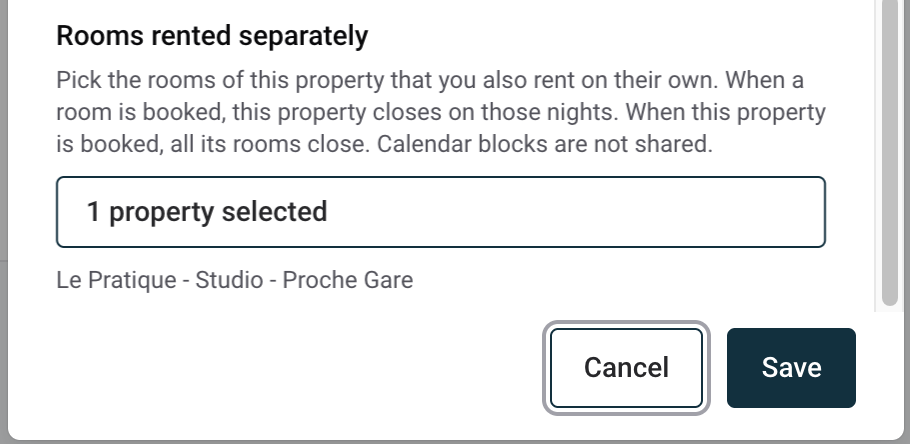
Scroll to the bottom of the drawer, to Rooms rented separately.
Click Select properties, search with Search a property..., tick each room, then click Apply. The linked rooms are listed under the button.
Click Save. The message Rooms linked. Your channels update within a few minutes. confirms the change.
Each room then shows Part of Villa Rosa at the bottom of its own Property infos drawer. Rooms are always linked from the whole property, never from the room.
To unlink a room, open the whole property's Property infos, untick the room in Rooms rented separately and click Save. Its nights reopen on your channels within a few minutes.
Why a property is missing or refused
The list only shows properties connected to Nowistay PMS, and tells you how many are hidden.
A property without an active subscription shows No active subscription and cannot be added.
A room that already belongs to another whole property must be removed from that property first.
A property that already has its own rooms cannot become a room.
What you see in the calendar
In Calendars, a night closed by a linked booking appears as Closed. Hover over it to read A linked property is booked on this night.
When you select such a night, the menu hides New booking and shows Some of these dates are closed because a linked property is booked.
In Edit price & availability, the Booking restrictions box shows Closed because a linked property is booked on these dates, with an Open property settings link. Reopening the night there does not reopen it on your channels while the linked booking exists.
Calendar blocks are not shared
A block (Block these dates, or availability closed in Edit price & availability) only applies to the property you block. This lets you choose what you sell, period by period:
Sell only the whole villa in August: block the 5 rooms for August. The villa stays open.
Sell only the rooms during a festival weekend: block the villa for that weekend. The rooms stay open.
Close everything for maintenance: block the villa and each of its rooms.
Airbnb: one listing for the whole property and one private room listing per room, each connected to its own Nowistay property.
Booking.com and Expedia: list each room once, as a room type of the same property. Groups book several rooms in a single reservation. Avoid adding the whole villa as an extra room type of that same property: one reservation could then contain the whole villa and one of its rooms at the same time.
VRBO: VRBO lists entire homes, so connect the whole property.
A manual booking on dates already booked on a linked property is refused, exactly like a double booking on the property itself (see how to add and manage manual bookings).
When a booking arrives, the linked properties close on your channels within seconds. As with any channel manager, two bookings made at the very same moment on two different channels can still overlap.
Each property keeps its own prices, minimum stay, automatic messages, cleaning missions and invoices. A booking on the whole villa only creates access codes for the smart locks connected to the villa itself.
Each linked property is billed as a normal property.
Ready to Put Your Rental on Autopilot?
Join 300+ property managers who save hours every week with AI-powered guest communication.