A leak in the bathroom, a heater that breaks down, or two identical rooms you want to rearrange: you can move a booking to another of your units in a few seconds. The booking keeps its dates and its price, and everything that serves the stay follows the guest to the new unit: guest messages, door code, check-out cleaning and the conversation.
Before you start
- Both units must be connected through the Nowistay PMS integration. Units that aren’t don’t appear as a destination.
- Only confirmed bookings that aren’t over can be moved: upcoming stays, and stays under way.
- The new unit must be free on the nights left. A booking on the unit, or on a linked unit (a whole villa and its rooms, see how to link a whole property and its rooms), blocks the move.
- Nights you closed yourself on the new unit don’t block it: Nowistay warns you, and these nights stay blocked for the stay.
Move a booking by drag and drop
On a computer, the quickest way is the calendar:
- Open Calendars.
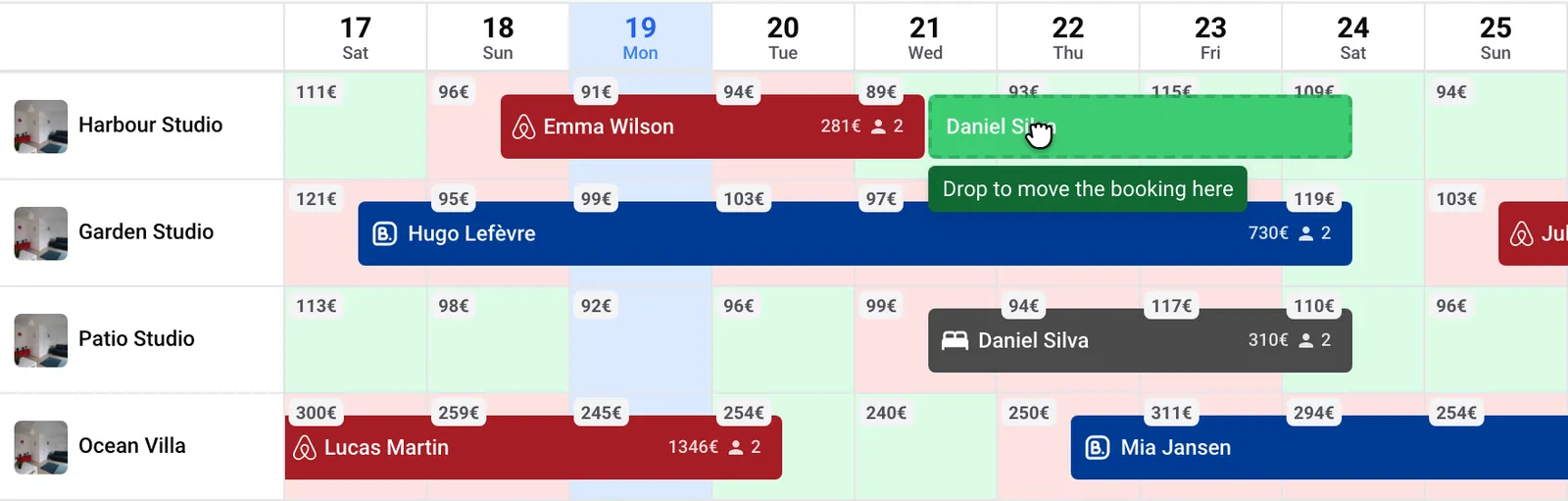
- Click the booking and hold the mouse button down, then drag it up or down onto the row of another unit. The booking only changes rows: its dates don’t move.
- While you drag, the booking turns green with Drop to move the booking here when the unit is free on those nights.
- Release the mouse button. The Move to another unit window opens with that unit selected.
- Read What happens, then click Move the booking.
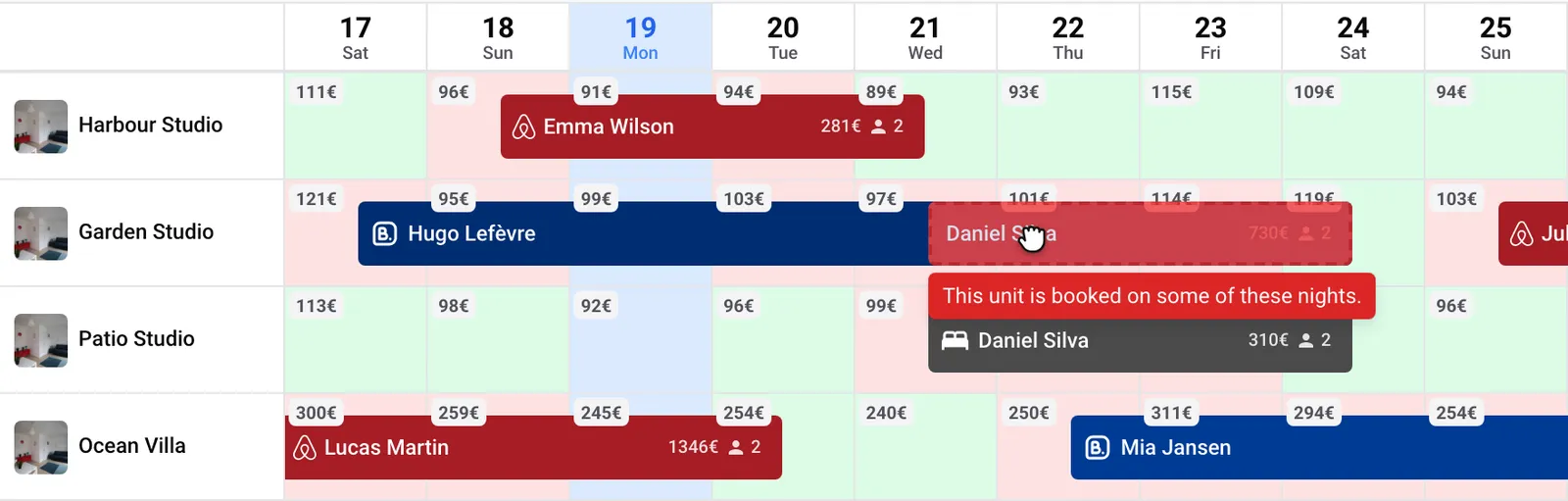
When the booking can’t go to a unit, it turns red and says why, for example This unit is booked on some of these nights. Keep dragging to another row, or press Escape to cancel.
Drag and drop works with a mouse or a pen. On a touchscreen, and for overlapping bookings shown together on one tile, use the booking details instead.
Move a booking from its details
This works on your phone too:
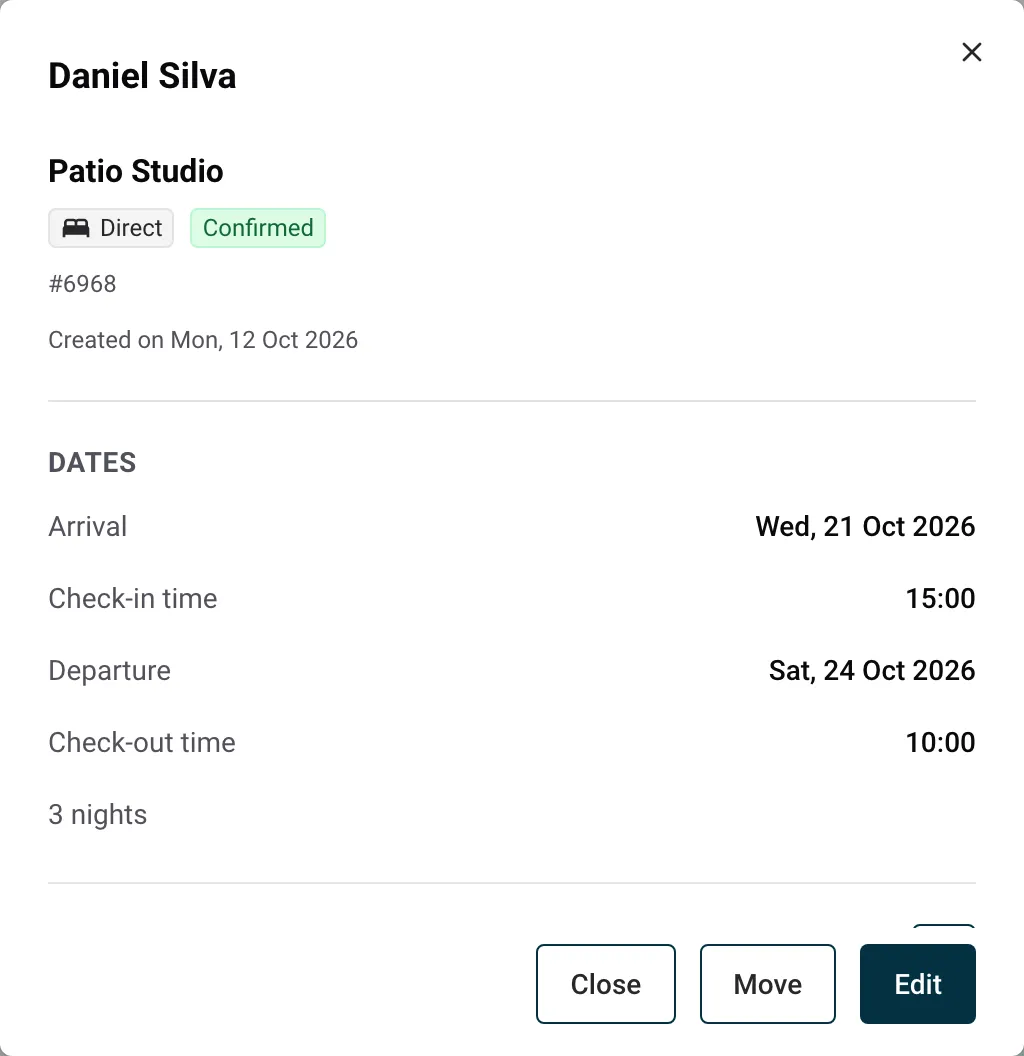
- Open the booking: click it in Calendars then View booking, or open it from Bookings.
- At the bottom of the booking details, click Move.
- Choose the New unit. Units that can’t receive the booking are greyed out, with the reason.
- Read What happens, then click Move the booking.
What happens when you move a booking
The Move to another unit window lists what will change for this booking before you confirm.
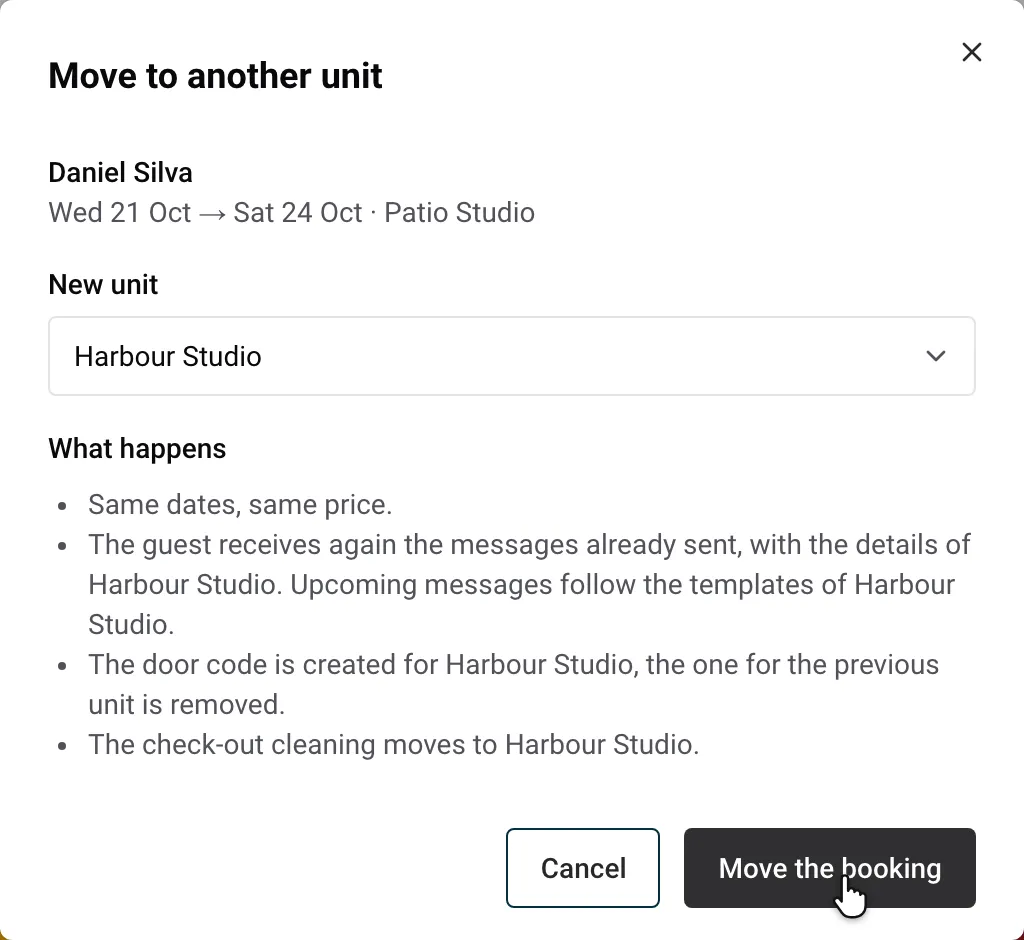
- Same dates, same price. Payments, deposits and paid extras stay with the booking.
- Availability: the new unit is closed on those nights on every connected platform, and the previous unit is released.
- Guest messages: about 5 minutes after the move, the guest receives again the messages already sent, with the new unit’s details. The next messages follow the new unit’s templates. If the new unit has no automated guest messages, the messages planned for the previous unit are cancelled and nothing is sent again.
- Door code: with a connected smart lock, a code is created for the new unit and the previous unit’s code is removed.
- Cleaning: the check-out cleaning moves to the new unit when it has automatic cleaning. Otherwise, no check-out cleaning is planned there.
- Conversation: the guest’s conversation follows the booking, and the AI co-host answers with the new unit’s information.
- Team: team members assigned to the booking who don’t work on the new unit are removed from it.
You can move the booking back the same way.
Moving a guest who is already there
When the guest has already arrived (from the check-in time of the arrival day), Nowistay also takes care of the unit they are leaving:
- the previous unit’s door code keeps working until midnight, so the guest can collect their things;
- the previous unit stays closed tonight and is released from tomorrow;
- the previous unit gets a cleaning today, if it has automatic cleaning;
- the new unit’s door code is created right away.
The platforms don’t let a channel manager change the listing of a reservation. When you move a platform booking, the move happens in Nowistay only:
- On the platform, the reservation stays on the listing of the original unit: the payout, the review and the conversation on the platform don’t change.
- In Nowistay, the stay, the messages, the door code and the cleaning are on the new unit. Later changes made on the platform (new dates, cancellation) still apply to the moved booking.
- The new unit is closed on those nights on every platform. On Airbnb, the original listing stays blocked on those nights by the reservation itself.
When a booking can’t be moved
Nowistay shows the reason in the window or on the dragged booking:
- Only confirmed bookings can be moved. Pending and cancelled bookings stay where they are.
- This stay is over.
- Bookings synced by calendar link can’t be moved: the next sync would bring them back.
- A payment is still pending for this booking. The guest hasn’t paid the payment link yet.
- This unit is booked on some of these nights. The unit, or a unit linked to it, has a booking on the nights left.
- This unit is paid to a different Stripe account than the one that received the payment. When the guest has already paid through Nowistay (stay, deposit or extras), the booking can only move to a unit paid to the same Stripe account.
- This unit can’t receive bookings. The unit isn’t connected through Nowistay PMS, or isn’t covered by your subscription.
For everything else you can do from the calendar (prices, availability, minimum stays), see how to manage your availability and prices from the calendar.
