Updated
Listing details hold the facts of a property that guests compare before booking: bedrooms, beds, bathrooms, the rooms and their beds, the amenities and the registration number. You fill them in once per property, by hand or from your Airbnb listing, and Nowistay uses them wherever it needs them, starting with your website and AI Pricing.
The panel opens with the property’s name at the top. Change what you need, then click Save at the bottom.
These three numbers are required for a property to appear on your website.
Describe each room and the beds it holds: choose the Type of room (a bedroom, a living room, a studio…), then for each bed its Type of bed and the Number of beds. Use Add a bed and Add a room to complete the list, Remove this bed and Remove this room to clean it up.
When you change the number of bedrooms, Nowistay adds or removes empty bedroom cards to match.
Rooms with beds are shown on your website’s property page, so guests see exactly where everyone sleeps.
Example: a two-bedroom apartment sleeping 5. Bedroom 1 has one double bed, Bedroom 2 has two single beds, and the living room has a sofa bed. Guests travelling with friends see at once that nobody shares a bed by chance.
Tick what the property offers. The list holds about 170 amenities, sorted into groups (bathroom, kitchen and dining, heating and cooling, internet and office, outdoor, parking, family, accessibility, safety…). Type a word in Search an amenity to find one quickly, for example “dishwasher” or “EV charger”.
Left empty, the list can be filled from your Airbnb listing.
The tourist rental registration number, if your city requires one. It is shown on the property’s page of your website, where some cities require it in every listing of the property. See Legal pages of your website for the rules of each country.
When the property has an Airbnb listing Nowistay can read, the panel shows a Your Airbnb listing box with two buttons:
While the listing is read, the panel shows Reading your Airbnb listing… and the fields can’t be changed. When it’s done, the panel shows the imported details: check them and correct anything Airbnb got wrong.
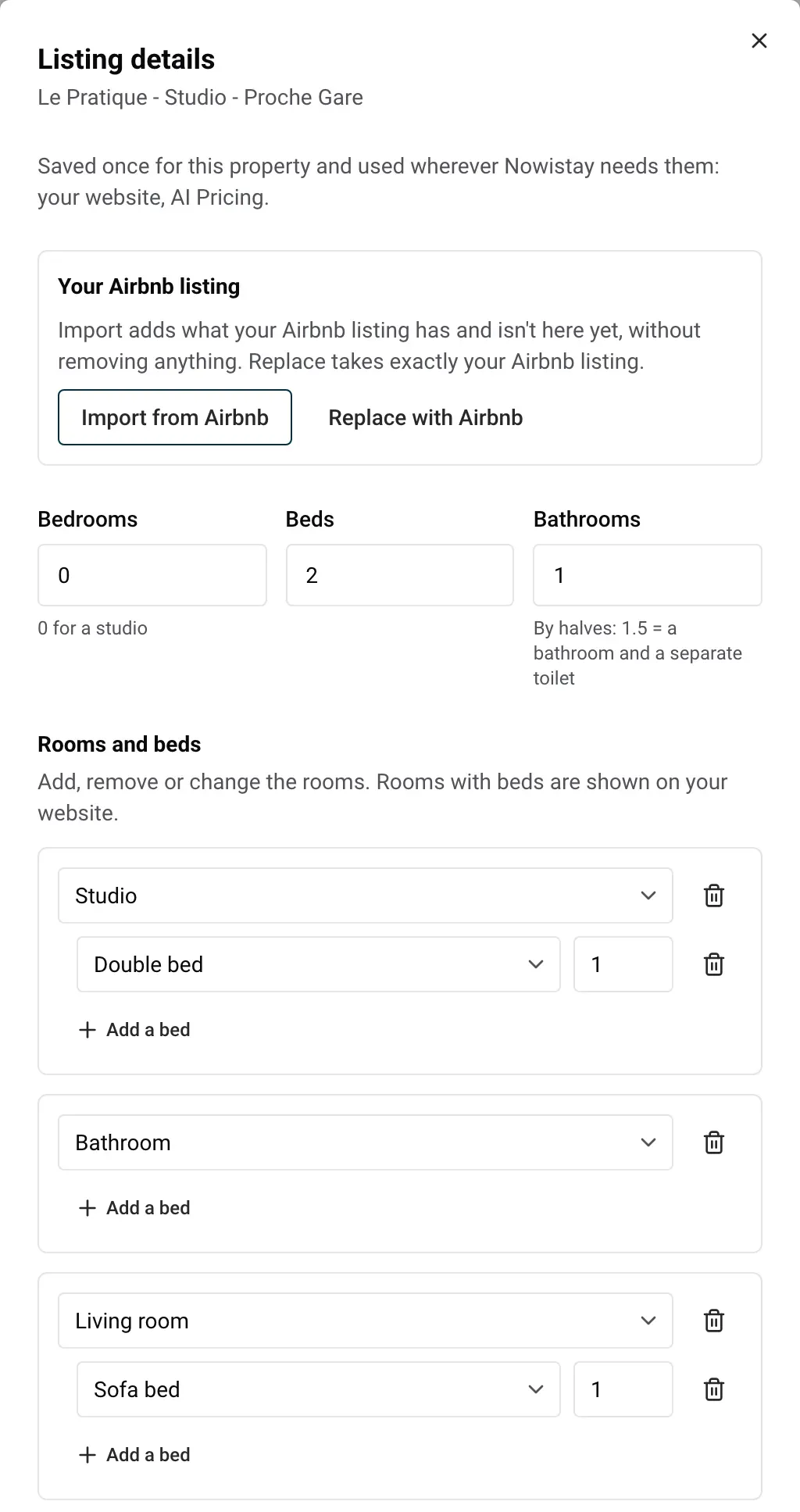
Nowistay also reads your Airbnb listing regularly and fills in the fields that are still empty. It never overwrites a value you entered.
No Airbnb listing? Fill in the details by hand: the panel works the same way, without the import box.
The guest capacity, the check-in and check-out times and the address are not here: they stay in Property infos, in the same … menu.
| Message | What to do |
|---|---|
| Some values need fixing before saving. | A number is out of range (for example 0 beds). Correct the field shown in red, then click Save again. |
| Importing from the public Airbnb page needs the AI plan for this property. | Activate the AI plan for the property, or fill in the details by hand. |
| An import is already running. | Wait a few seconds for the current import to finish. |
| Your Airbnb listing couldn’t be read. Try again later. | Try again later, or fill in the details by hand. |
| You can change the number of bedrooms 3 times a day. Try again tomorrow. | The bedroom count feeds AI Pricing, so it can only change 3 times a day. Try again the next day. |
Guides for hosts: read the blog.
Ready to Put Your Rental on Autopilot?
