AI Pricing suggests a nightly price for every free night of your calendar over the next 2 years, with the reason behind each change. It starts from your own typical price, then follows the market around your property: seasons, weekends, holidays, demand and the prices of similar homes nearby. It is included in the AI Channel Manager subscription at no extra cost.
The property is connected to Nowistay PMS, the Nowistay channel manager (see how to connect your booking channels). AI Pricing writes its prices there, and they reach every connected channel: Airbnb, Booking.com, VRBO, Expedia and your direct booking website.
The property has the AI Channel Manager subscription.
Its prices are not managed by PriceLabs (see below).
It is a single unit: multi-unit properties are not supported yet.
When a property is not eligible, its row on the AI Pricing page shows what to do instead of the settings, for example Switch to Nowistay PMS or Upgrade to AI Channel Manager.
Where every price starts: your typical price
Every suggestion is built around your Typical price: your default nightly price, the same one as in the property information. Think of it as your average price over the year. AI Pricing never changes it on its own. It moves each night up or down around it, so applying suggestions never makes your prices drift.
Two more settings shape the result:
Minimum price: AI Pricing never suggests a lower price.
Quality: how your home compares with similar homes nearby (Below average, Average or Above average). Only you know the renovation, decoration and service level you invested in. An above-average home gets smaller discounts and follows strong demand further; a below-average home gets deeper discounts to fill its free nights.
What AI Pricing looks at
For each free night, AI Pricing combines:
The season. How the prices of similar homes nearby change over the year (higher in summer, lower in November, for example), softened so your prices stay steady.
Weekends and peaks. How much more, or less, similar homes charge that night compared with the nights around it: weekends, long weekends, local events.
Demand. The share of similar homes nearby that are no longer available that night, compared with what is usual for that kind of night. When many more homes than usual are taken, your price goes up. When far fewer are taken, it can go down.
Holidays. Public holidays, long weekends and school holidays for your area, by zone where the country has zones. They are shown on the price curve and given as reasons when the market confirms them.
Local events. When a concert, a fair or a festival explains a peak of demand, its name can appear as the reason. An event name never changes a price by itself: the demand does.
The last minute. A few days before arrival, a night that is still free gets a gradual discount, up to 15% on the last days for an average home (10% above average, 20% below average). The window starts from how far ahead your own guests usually book, between 3 and 14 days (7 by default), and the minimum stay of those nights can drop to 1 night. There is no last-minute discount when demand is high, or when your Airbnb last-minute discount already covers the night.
Orphan nights. 1 to 3 free nights between two bookings in the next 60 days, or a gap shorter than your minimum stay, get a price 15% lower and a minimum stay shortened to their number of nights, so they can sell.
Your instructions. Rules you write in your own words, such as "Never below €90 on weekends", come first. See how to add your own rules.
Beyond 12 months, few homes have opened their calendars yet, so AI Pricing follows the seasons it measured over the coming year and the holidays already known.
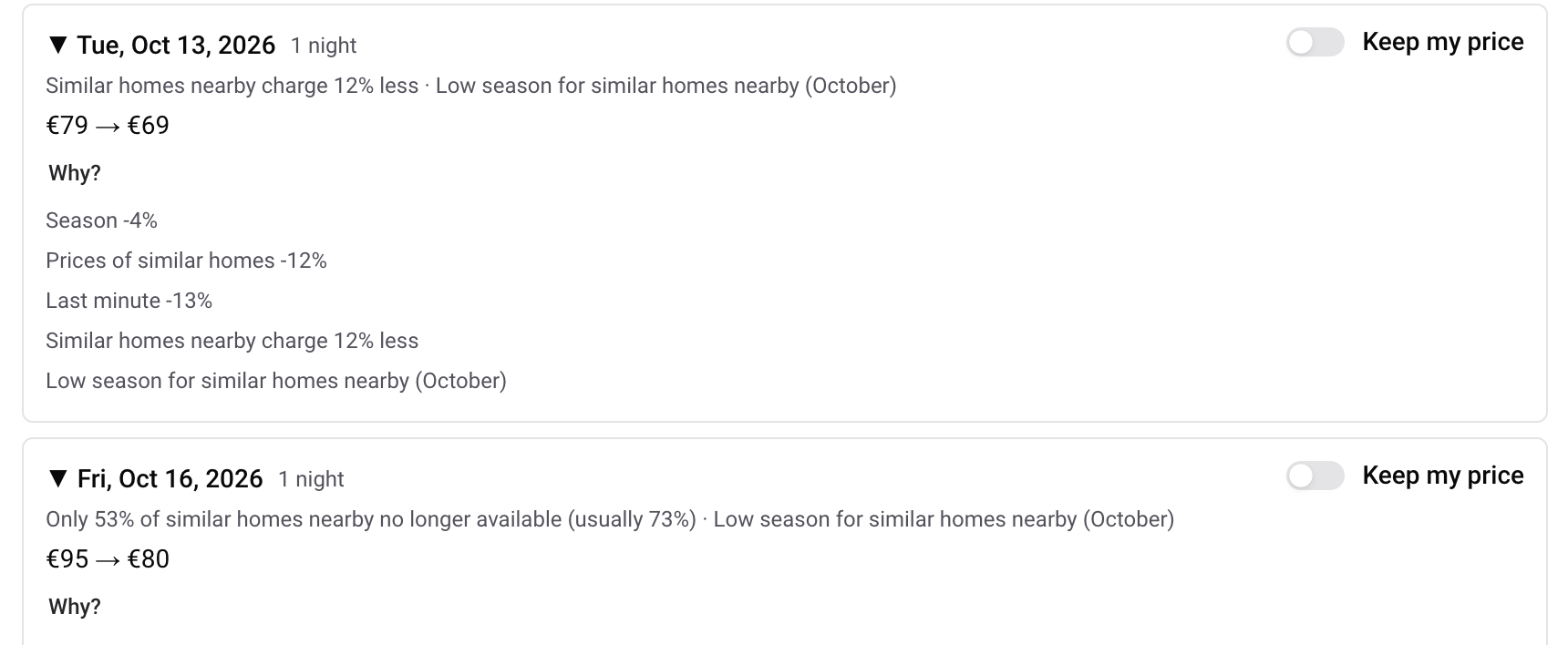
Every change comes with its reasons. In a property's proposal, Review nights then Why? shows how much each factor moved the price:
The similar homes it follows
AI Pricing follows about 20 similar homes near yours: same number of bedrooms (one fewer if there are not enough), a similar number of guests, within a few kilometres. To see them, open the property's proposal and click the Similar homes tab. Each home shows its distance, rating, size and how often it is unavailable over the next 12 months. Homes with no reviews yet, almost always unavailable, or with an unknown calendar are marked Not used.
The tab also gives the median price of the available similar homes with your number of bedrooms, cleaning included, and yours on the same basis. If your listing counts a cabin, a mezzanine or a sofa bed as a bedroom, change Compared with homes with and click Save (up to 3 times a day).
The availability of these homes is checked every few days, and their prices about once a week for the coming weeks (less often for later dates), overnight. When prices are older than usual, the property shows Market data from followed by the date.
The safeguards
Never below your Minimum price, and never above 3 times your typical price on its own.
Prices only go down for nights in the next 60 days that are not selling: inside the last-minute window, or when your bookings are well behind similar homes nearby. Orphan nights are the exception. Increases can apply to any date.
Small differences are not proposed: a change must be at least 8% and at least €5.
When you keep your own price on a night, AI Pricing does not propose it again for 14 days, unless the market moves the target by 10% or more.
Prices are calculated, never guessed: the same data always gives the same price. AI reads your written instructions and names local events, but it never sets a price by itself.
Nothing changes without you. Every eligible property starts in Suggestions mode, where you apply each proposal yourself. Automatic mode is opt-in, property by property.
Which price it suggests
Prices shown are your nightly prices in Nowistay, before each channel's own adjustment (for example +15% on Airbnb), excluding cleaning fee and taxes. Your channel adjustments stay in place on top of the new price.
When suggestions arrive
The first time, AI Pricing analyzes your market and the row shows Analyzing your market. Your first proposal usually arrives within the hour. Nothing is proposed until then, so you never act on incomplete data.
Then every morning, the proposal is recalculated with the latest market data and bookings. It is also recalculated a few moments after you change a setting.
Limited data. When fewer than 3 similar homes can be used, the property shows Limited data. The proposal then relies on your calendar only (weekends and holidays, orphan nights, last minute): check it before applying it. Automatic mode is paused for that property until enough data is back.
Moving from PriceLabs
A property connected to PriceLabs shows Prices managed by PriceLabs. Click Use AI Pricing instead, then Use AI Pricing: the property is removed from your PriceLabs connection (if it was the only one, the PriceLabs key is revoked). Also stop the listing in your PriceLabs account so it no longer sends prices. A property in Automatic mode cannot be added to PriceLabs. More on the integration: how to connect PriceLabs.