PriceLabs is a popular dynamic pricing tool that helps vacation rental hosts optimize their nightly rates based on market demand, seasonality, and local events. By connecting PriceLabs to your Nowistay properties, you can automate your pricing strategy and maximize your revenue, without manually adjusting rates every day.
Nowistay also includes its own dynamic pricing, AI Pricing (beta), at no extra cost with the AI Channel Manager subscription. Each property uses one or the other: PriceLabs or AI Pricing.
This guide walks you through the full setup: generating your API key in Nowistay and importing your listings into PriceLabs.
What you need before you start
Before connecting PriceLabs, make sure you have the following:
A Nowistay account with the AI Channel Manager subscription: the PriceLabs integration is available for users with the AI Channel Manager plan.
Properties connected via the Nowistay PMS integration: only properties connected through the Nowistay PMS can be linked with PriceLabs. If you haven’t connected your properties yet, check out our guide on how to create your first property.
A PriceLabs subscription: you’ll need an active PriceLabs account to use their dynamic pricing features. You can sign up at pricelabs.co.
Step 1: Generate your API key in Nowistay
Nowistay makes the setup easy by generating a dedicated API key for you directly from your dashboard:
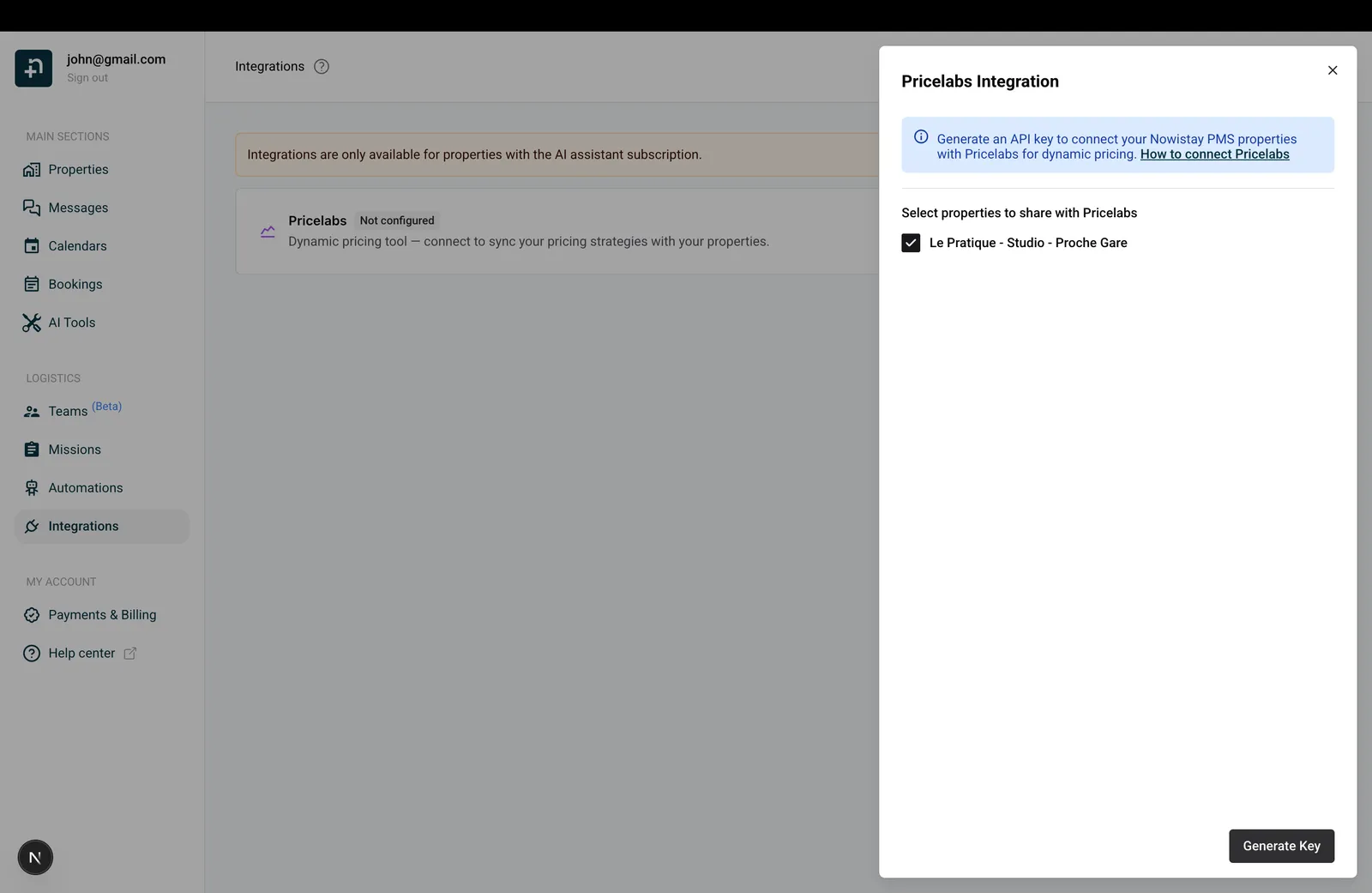
Log in to your Nowistay dashboard and go to “Integrations” from the sidebar menu.
Find the PriceLabs card and click “Configure”.
In the drawer that opens, select the properties you want to connect to PriceLabs by checking the corresponding boxes.
Click “Generate Key”.
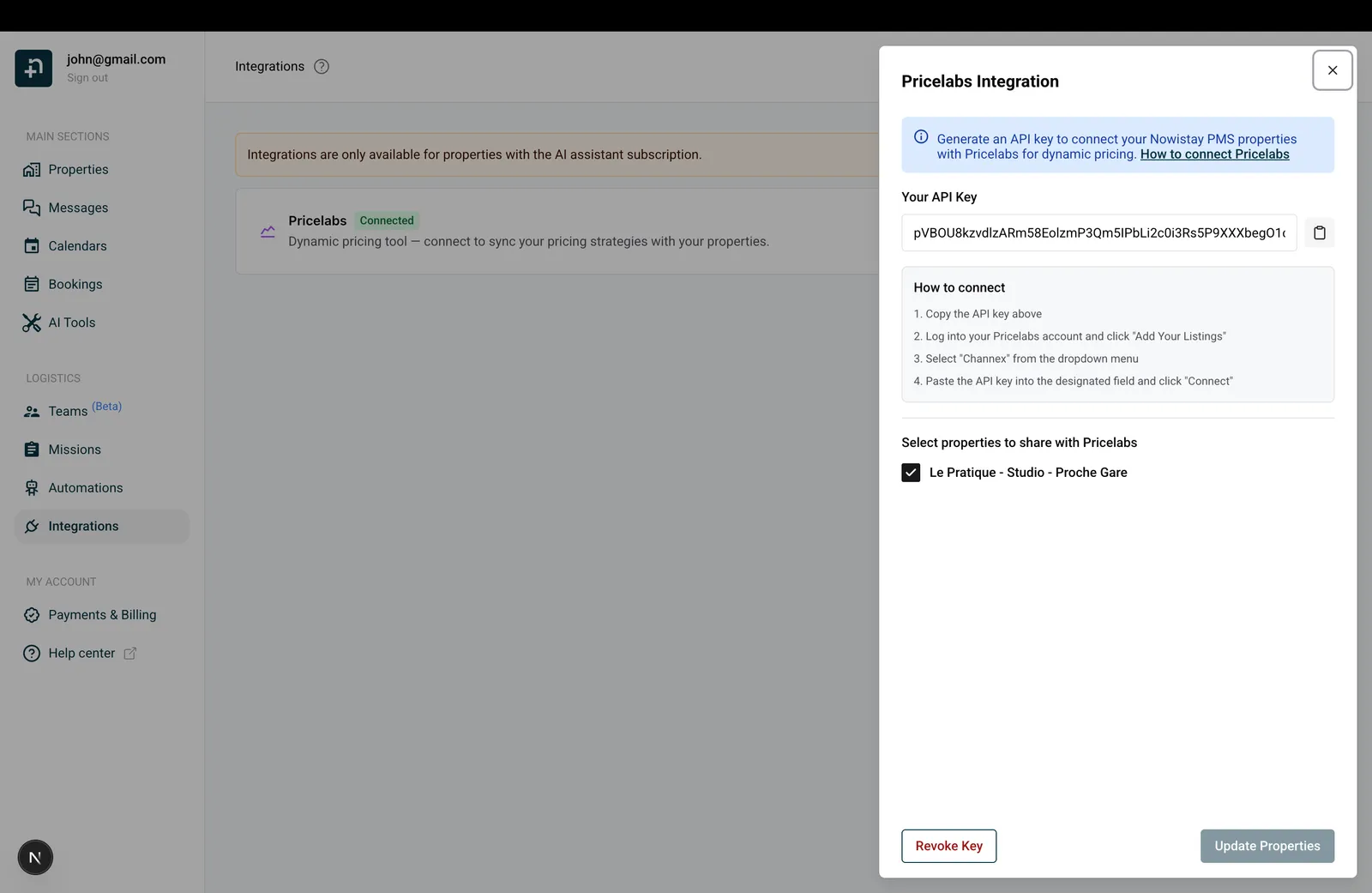
Your API key will be displayed. Copy it using the copy button. You’ll need it in the next step.
[Screenshot needed: Nowistay integrations page with PriceLabs card and drawer open]
Generate a pricelabs keyKey configuration and properties activation
Step 2: Import your listings into PriceLabs
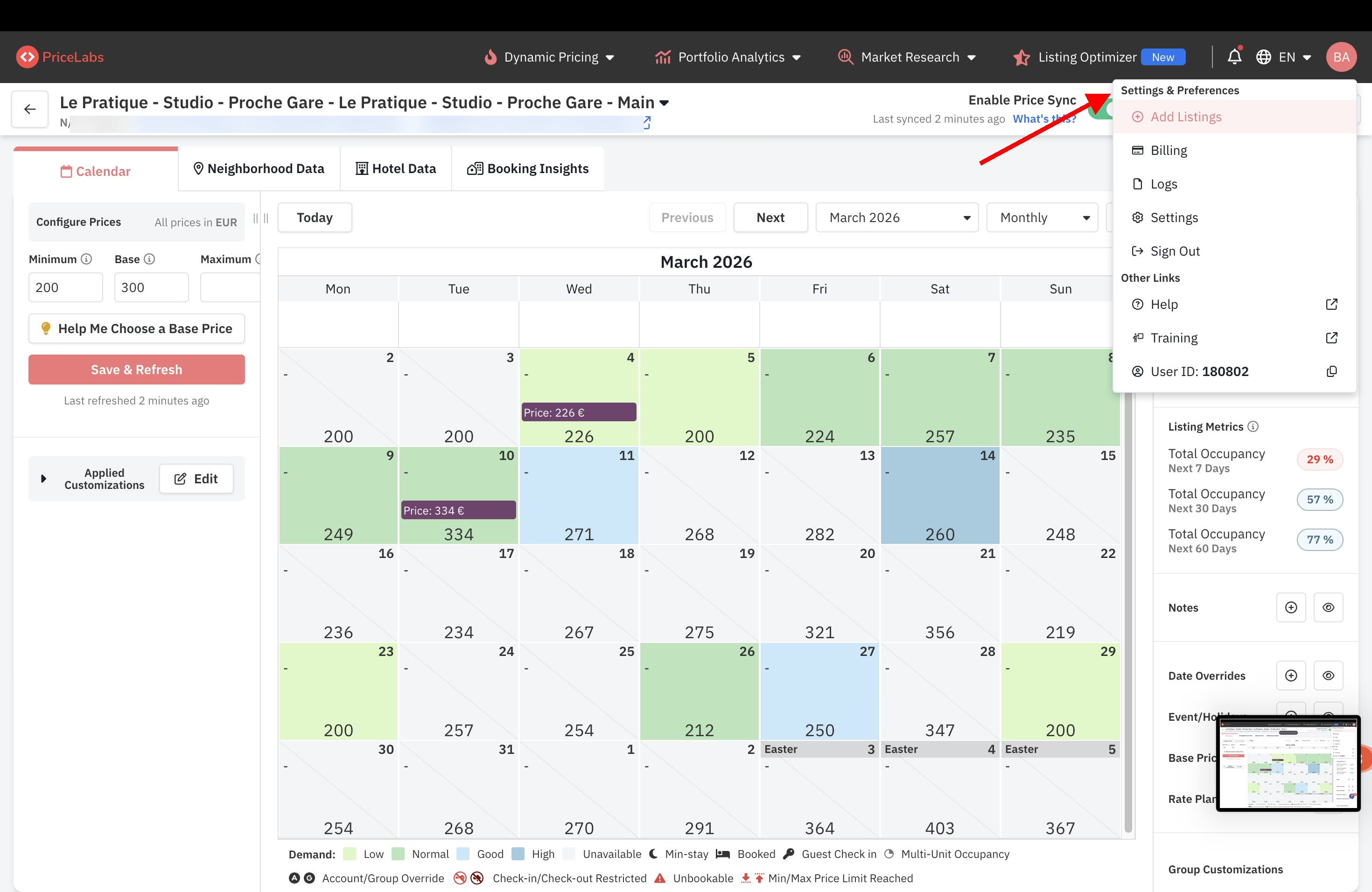
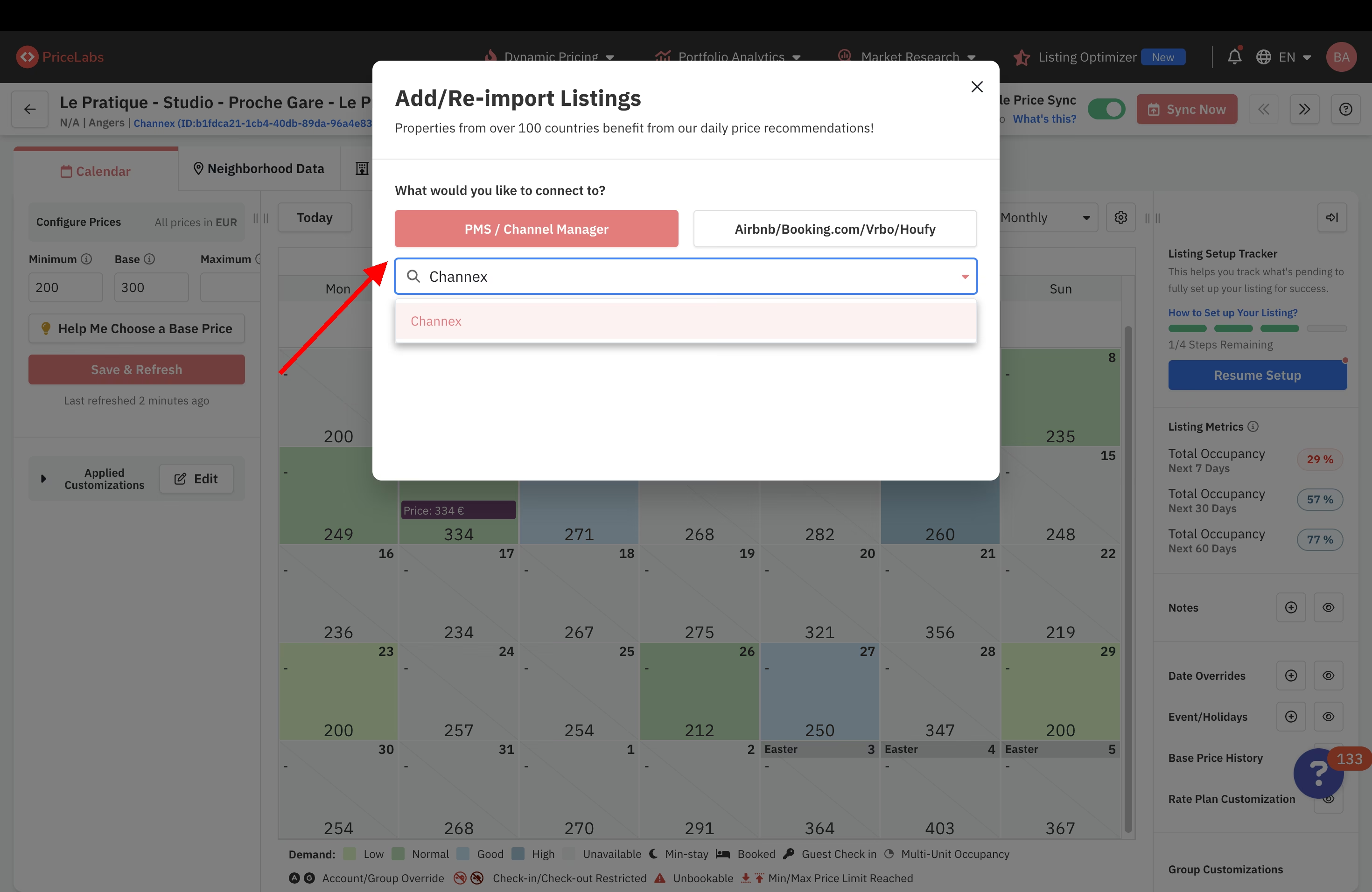
Now that you have your API key, head over to PriceLabs to import your listings:
Review your pricing and adjust your base prices, minimum and maximum rates, and seasonal adjustments.
Enable “Sync Prices” for automatic daily updates, or click “Sync Now” to push changes immediately.
PriceLabs can update dynamic rates, minimum stay settings, and check-in/check-out restrictions for your properties up to 540 days in advance.
Managing your integration
You can manage your PriceLabs connection at any time from the Integrations page in Nowistay:
Update properties: add or remove properties from the integration by opening the PriceLabs drawer and updating your selection.
Revoke the key: if you need to disconnect PriceLabs, click “Revoke” in the drawer. This will invalidate the API key and disconnect the integration.
Regenerate a key: after revoking, you can generate a new key and reconnect at any time.
Changing your PMS connection (after reconnecting a property)
If you need to change the PMS connection for one of your listings (for example, after reconnecting a property through the Nowistay PMS), PriceLabs does not allow updating the PMS connection of an existing listing. You will need to create a new listing in PriceLabs connected to the new PMS integration.
To avoid having to reconfigure everything from scratch, PriceLabs offers a Parent/Child mapping feature that lets you transfer the exact same configuration from your old listing to the new one. Here is how to do it:
Step 1: Add the new listing and connect it
First, follow Steps 1 and 2 above to generate a new API key (if needed) and import your new listing into PriceLabs. Make sure the new listing appears in your PriceLabs dashboard.
Step 2: Map the old listing as Parent and the new one as Child
This step copies all the pricing settings from your existing (old) listing to the new one:
In PriceLabs, navigate to Dynamic Pricing → Manage Listings.
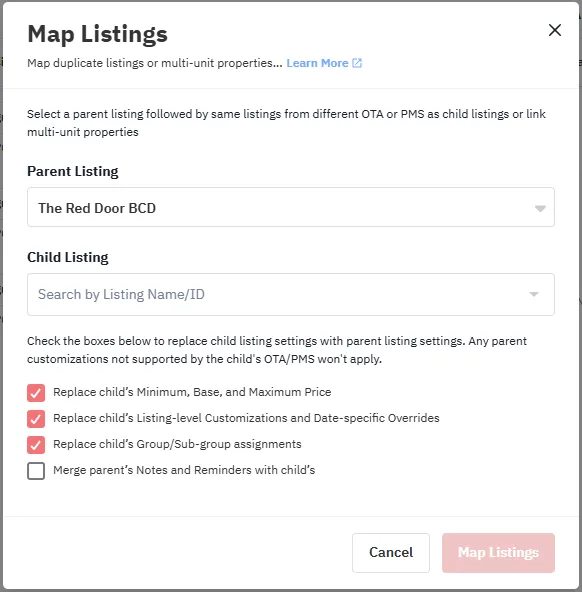
Click the “Map Listings” button.
Select the old listing (the one you want to copy settings from) as the Parent Listing.
Select the new listing as the Child Listing.
Check the boxes to apply the parent’s settings:
Replace child’s Minimum, Base, and Maximum Price
Replace child’s Listing-level Customizations and Date-specific Overrides
Replace child’s Group/Sub-group assignments
Click “Map Listings” to complete.
This transfers the exact same configuration to the child listing (the new one). For more details, see PriceLabs’ mapping guide.
PriceLabs Map Listings dialog: select the old listing as Parent and the new one as Child
Step 3: Unmap the listings
Once the configuration has been transferred, unmap the listings so the new one operates independently:
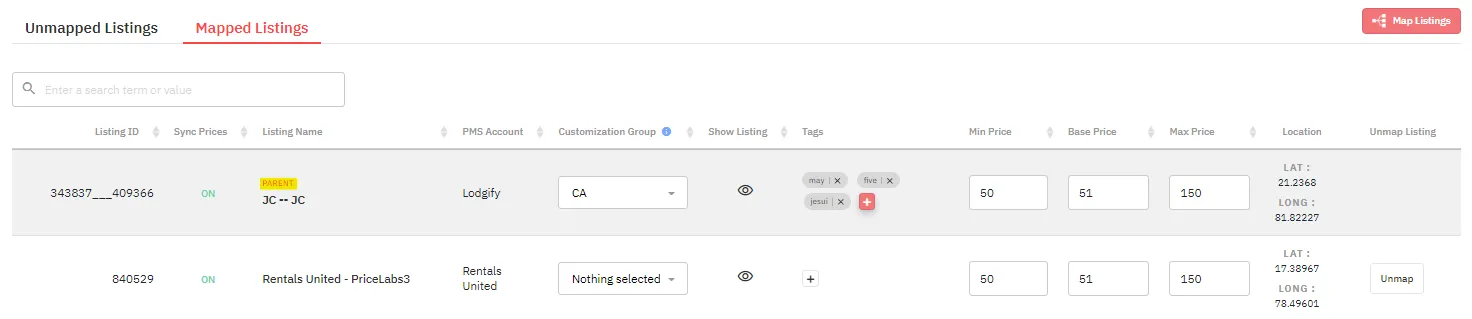
Click the “Unmap” button on the child listing (the new one).
The new listing now has all the same settings as the old one and operates independently.
PriceLabs Manage Listings: click Unmap on the child listing
Step 4: Sync your prices
After unmapping, launch a manual sync to update prices right away:
Click “Sync Now” on the new listing to push prices immediately.
Enable “Sync Prices” if not already enabled. This will automatically sync prices every day (usually at night).
Step 5: Delete the old listing
You can now safely delete the old listing from PriceLabs, as the new one has inherited all its settings and is fully operational.
Avoiding double billing
PriceLabs invoices based on the maximum number of listings that were enabled at least once during the current month. Since you temporarily had both the old and new listings enabled, you may be billed for both.
To avoid paying twice, contact PriceLabs support at support@pricelabs.co and explain that both listings were active for only a few minutes due to a PMS connection change. Their team will understand the situation and adjust your next invoice accordingly.
Good to know
PriceLabs only supports per-room-type pricing. Occupancy-based or per-person pricing is not supported.
If you update prices manually through Nowistay while PriceLabs is connected, PriceLabs may override your manual changes during its next sync. To avoid conflicts, manage your pricing exclusively through PriceLabs when the integration is active.
PriceLabs does not receive direct bookings via the API. To add direct booking data for revenue analytics, use PriceLabs’ CSV upload feature in Portfolio Analytics.
Switching a property to AI Pricing: on the AI Pricing page, a property connected to PriceLabs shows Prices managed by PriceLabs. Click Use AI Pricing instead, then Use AI Pricing: the property is removed from your PriceLabs connection (if it was the only one, the PriceLabs key is revoked). Also stop the listing in your PriceLabs account so it no longer sends prices. See how AI Pricing sets your prices.
AI Pricing Automatic mode: a property in Automatic mode can’t be added to the PriceLabs connection. Turn off Automatic on its row of the AI Pricing page first.