How to dispute a bad Airbnb review and request its removal
A bad review hurts, but Airbnb only removes a review when it breaks its Reviews Policy. The Dispute an Airbnb review tool checks the review against that policy, using the booking and your conversation with the guest as evidence. It tells you honestly whether you have grounds and prepares a factual removal request. You then submit the request to Airbnb yourself.
When Airbnb may remove a review
Under Airbnb's Reviews Policy, a review can be considered for removal when, for example, it is:
Fake, or not based on a real reservation.
Irrelevant: the reviewer did not have a first-hand experience of the stay.
Biased, extortionate or obtained under pressure: for example, a guest who threatens a bad review to get a refund, or a review obtained in exchange for an incentive.
Used to harm a competitor.
Retaliation: the guest broke an Airbnb policy, was informed of it, and left a biased review because the violation was reported.
Prohibited content under Airbnb's Content Policy.
On the other hand, disagreeing with the star rating, a subjective opinion or a problem outside your control are not grounds on their own, and Airbnb generally does not arbitrate disputes about whether a review is accurate. A negative review is not automatically a removable one, and the tool will tell you when that is the case.
Before you start
The property needs the AI Channel Manager subscription. Without it, the AI tools are greyed out in the menu.
To pick the review from a list, Nowistay needs to know the property's Airbnb listing (found automatically when the property is connected to Airbnb through Nowistay PMS or when its Airbnb link was already saved). You can always paste the text of the review instead.
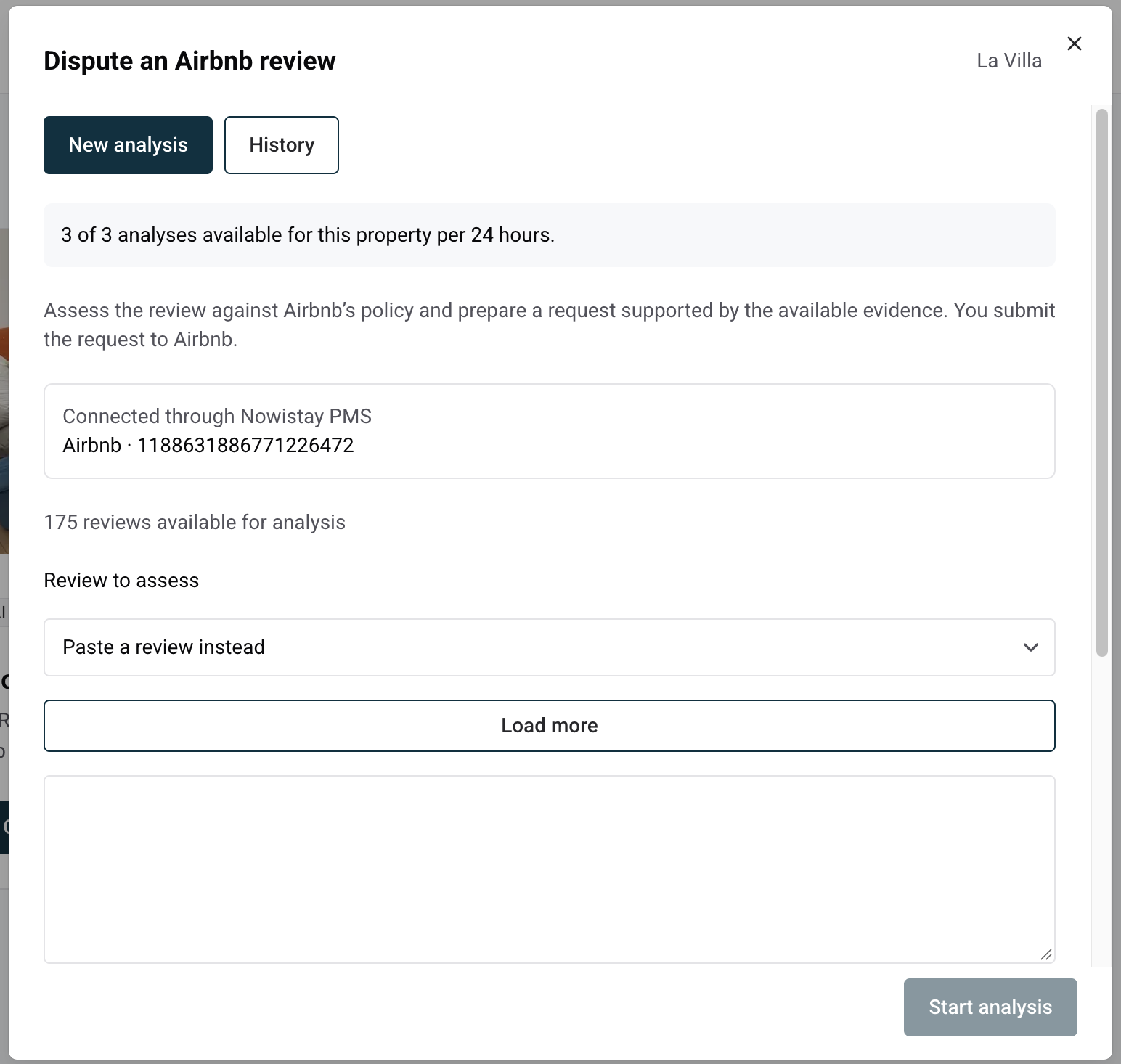
Click the … menu on the property card (or at the end of the property row in list view) and select Dispute an Airbnb review. Shortcut: in Score & Reviews, click Dispute an Airbnb review under the review; it opens with that review already selected.
In Review to assess, choose the review from the list (date, rating and the start of the text). Click Load more to see older reviews. If the review is not listed, keep Paste a review instead and paste its text.
Link the booking. When the property is connected through Nowistay PMS, the review is usually matched to its booking automatically. Otherwise, under Link a booking if needed, type the guest's name in Search by guest name and select the Airbnb booking.
Once the booking is linked, its dates and the Guest conversation included section appear. It contains the messages exchanged with the guest up to the date of the review; later messages are left out because they cannot explain the review. If the conversation is very long, only part of it fits: the panel tells you, and you can add the missing key messages in the next step.
In Additional context and evidence, describe what happened with facts and dates: a house rule broken, damage, a threat made in a message, what you reported to Airbnb and when. Stay factual: what you write is treated as your own statement unless the booking or the conversation confirms it.
Click Start analysis.
What you get in the report
The assessment, with one of three conclusions: supported grounds, insufficient evidence, or no apparent grounds.
The applicable policy and the exact passages of the review concerned.
The evidence for and against, taken from the booking, the conversation and your context.
A missing evidence checklist: what would strengthen your request, such as a message, a photo or a report made to Airbnb.
Next steps.
When grounds are supported, a short, factual removal request is ready to Copy. It names the policy ground and only cites evidence that actually exists. When evidence is insufficient, the report explains exactly what is missing and never presents an accusation as a fact. When there are no grounds, it explains why and may suggest a calm public reply instead.
Below the report, Context used for this report shows exactly what was analyzed, and the Airbnb Reviews Policy link opens Airbnb's official policy.
Submit the request to Airbnb
Nowistay never contacts Airbnb on your behalf. To send your request, follow the removal request process described in Airbnb's Reviews Policy:
Select the review and the removal reason that matches the ground identified in the report.
Paste the prepared request.
Attach your supporting documents, such as screenshots of messages or photos.
Airbnb alone makes the decision. No tool can guarantee a removal, so the report never gives a success rate.
If the review stays online
A calm, factual public reply reassures future guests more than a silent bad review. If the property is connected through Nowistay PMS, you can reply directly from Score & Reviews.
Usage limits and history
You can run 3 dispute analyses per property every 24 hours. The counter at the top of the panel shows how many are left. An analysis that fails does not count.
Every report is kept in History. Run a new analysis reopens the form with the same review, booking and context, which is handy after you add new evidence. Delete report removes a report but does not give the analysis back.
The report is written in the language you use Nowistay in.
Ready to Put Your Rental on Autopilot?
Join 300+ property managers who save hours every week with AI-powered guest communication.