
AI coverage: see what your AI handles and import your Airbnb history
Updated
AI coverage tells you how much of your guest messaging the AI assistant handles without you, and what to do to raise that share. Its first step imports your past Airbnb conversations, so the AI learns the answers you already gave guests before you joined Nowistay.
Where to find AI coverage
Open the Messages page. At the top right, next to the automatic messages button, a gauge button shows the share handled by the AI over the last 30 days, for example AI 71%. An orange dot means at least one step is still open. Click the button to open the AI coverage panel.

AI coverage is available on accounts with the AI assistant plan. Team members with access to Messages see the figures. The steps also need access to Properties, and the Airbnb import is reserved for the account owner.
How to read the figures
Handled by the AI is the share of guest requests the AI dealt with by itself. A request is one message, or several messages sent in a row by the same guest before anyone answers. Choose the period with 7 days, 30 days or 90 days.
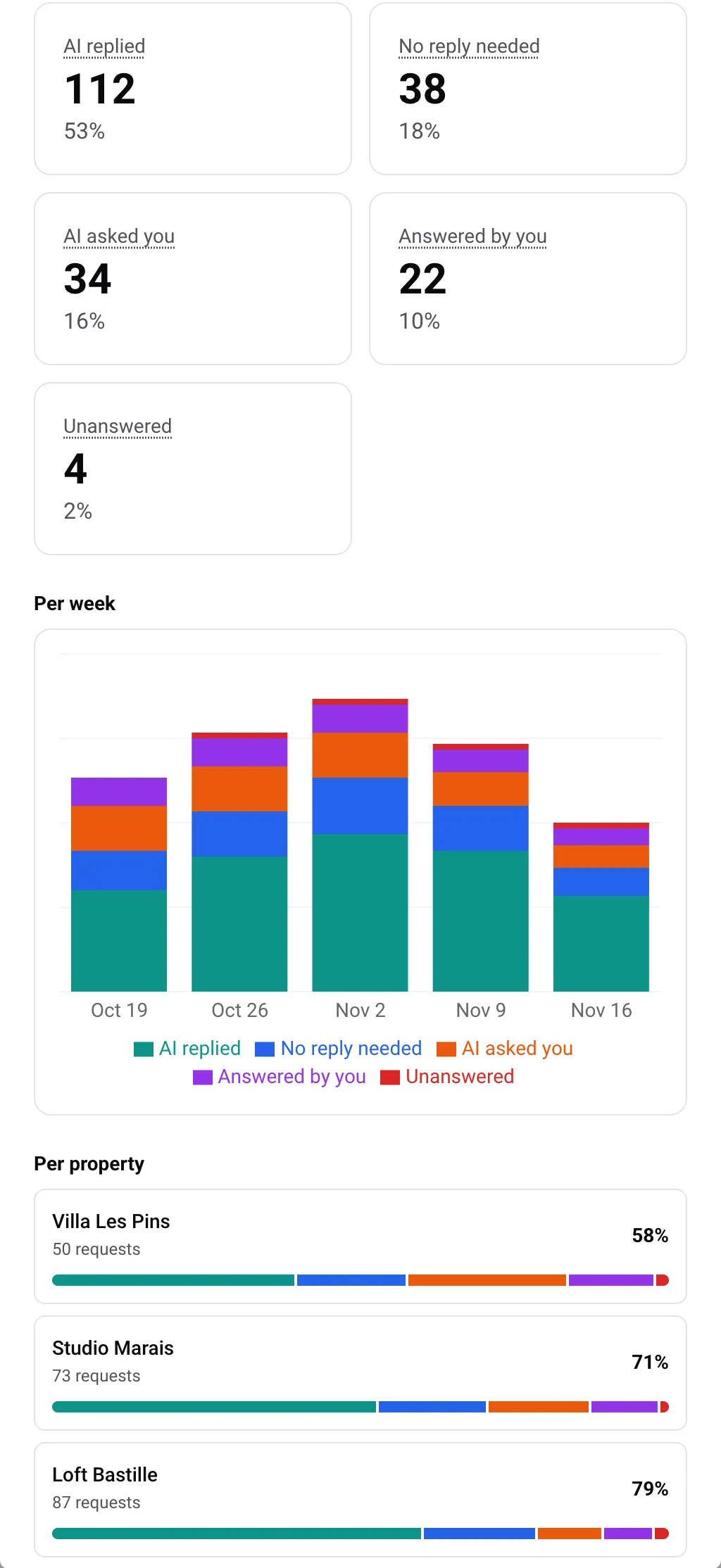
Each request falls into one of five groups:
- AI replied: the AI answered the guest by itself.
- No reply needed: the AI judged the message needed no answer (a thank-you, a confirmation).
- AI asked you: the AI did not send an answer and asked you to reply.
- Answered by you: you or your team answered, because the AI was off, paused, in draft mode or outside its hours.
- Unanswered: nobody has answered yet.
The first two groups make up the share handled by the AI. Per week shows how the groups evolve week after week, and Per property lists your properties from the lowest share to the highest, so you see where to act first.
Five steps to raise your coverage
Under the headline figure, Raise your coverage lists five actions. Each one is ticked automatically when it is done.
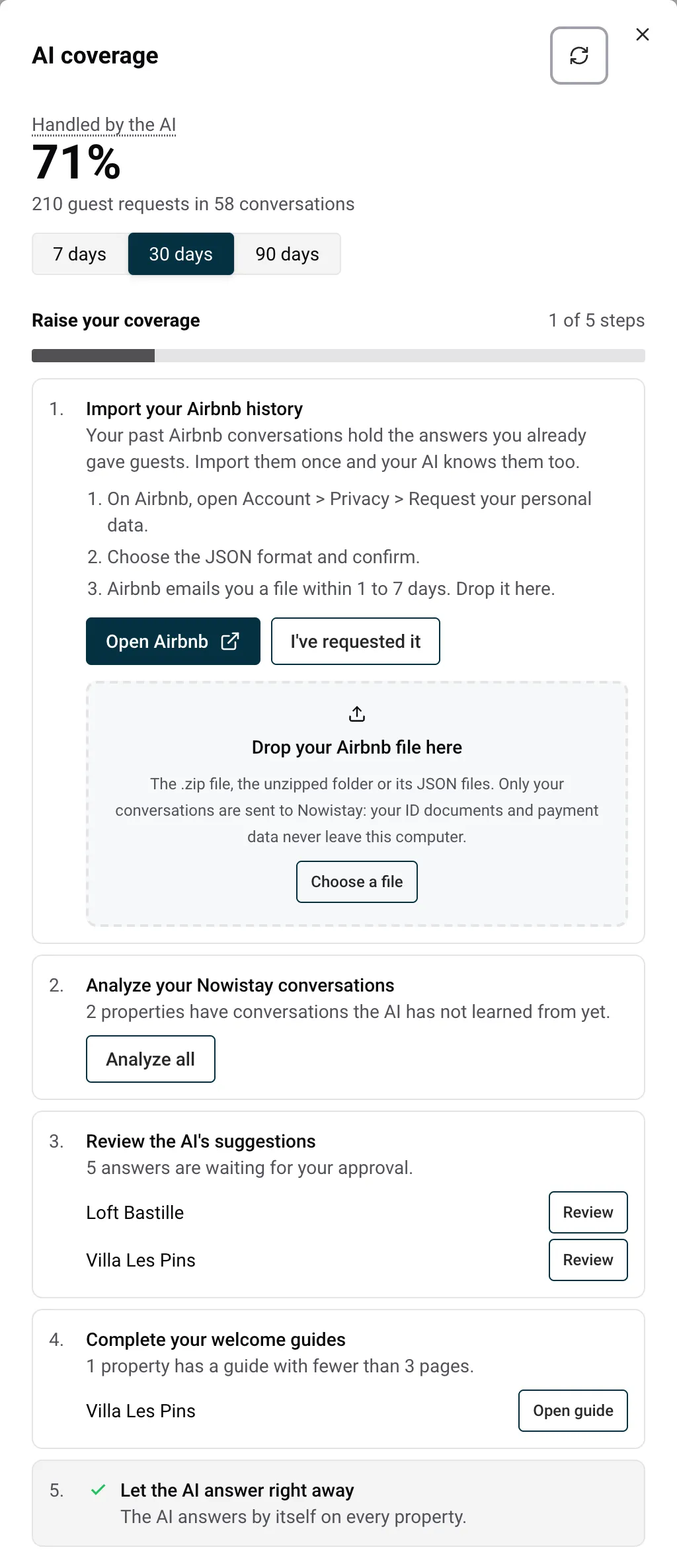
- Import your Airbnb history: detailed in the next section.
- Analyze your Nowistay conversations: Analyze all reads the conversations Nowistay already holds, on every property not analyzed yet, and prepares suggested answers. It runs once per property.
- Review the AI’s suggestions: Review opens the property’s private knowledge base, where you add, edit or dismiss each suggested answer.
- Complete your welcome guides: a guide with fewer than 3 pages leaves the AI with too little to answer from. Open guide takes you to the guide of each property concerned.
- Let the AI answer right away: in draft mode the AI prepares replies but you send them, so none counts as handled by the AI. AI settings opens the property’s assistant settings.
Import your Airbnb history
Over the years you have already answered most recurring questions in your Airbnb messages: where to park, how the heating works, where the spare towels are. The import turns those answers into knowledge for your AI.
1. Ask Airbnb for your data
- In the first step, click Open Airbnb. On Airbnb, open Account, then Privacy, then Request your personal data.
- Choose the JSON format and confirm.
- Back in Nowistay, click I’ve requested it. Airbnb sends the file by email within 1 to 7 days, and Nowistay reminds you by email to come back and import it.
2. Drop the file in Nowistay
When Airbnb’s email arrives, download the file and drop it on Drop your Airbnb file here, or use Choose a file. You can drop the .zip file as it is, the unzipped folder, or its JSON files.
Your browser opens the file itself and sends only your conversations to Nowistay. The rest of the export (ID documents, payment data, search history) never leaves your computer. The HTML and Excel versions of the export are not accepted: if you picked one of them, request your data again and choose JSON. The conversations can weigh up to 50 MB.
3. Check the properties and start
Nowistay matches each Airbnb listing to one of your properties and shows how many conversations will be analyzed.
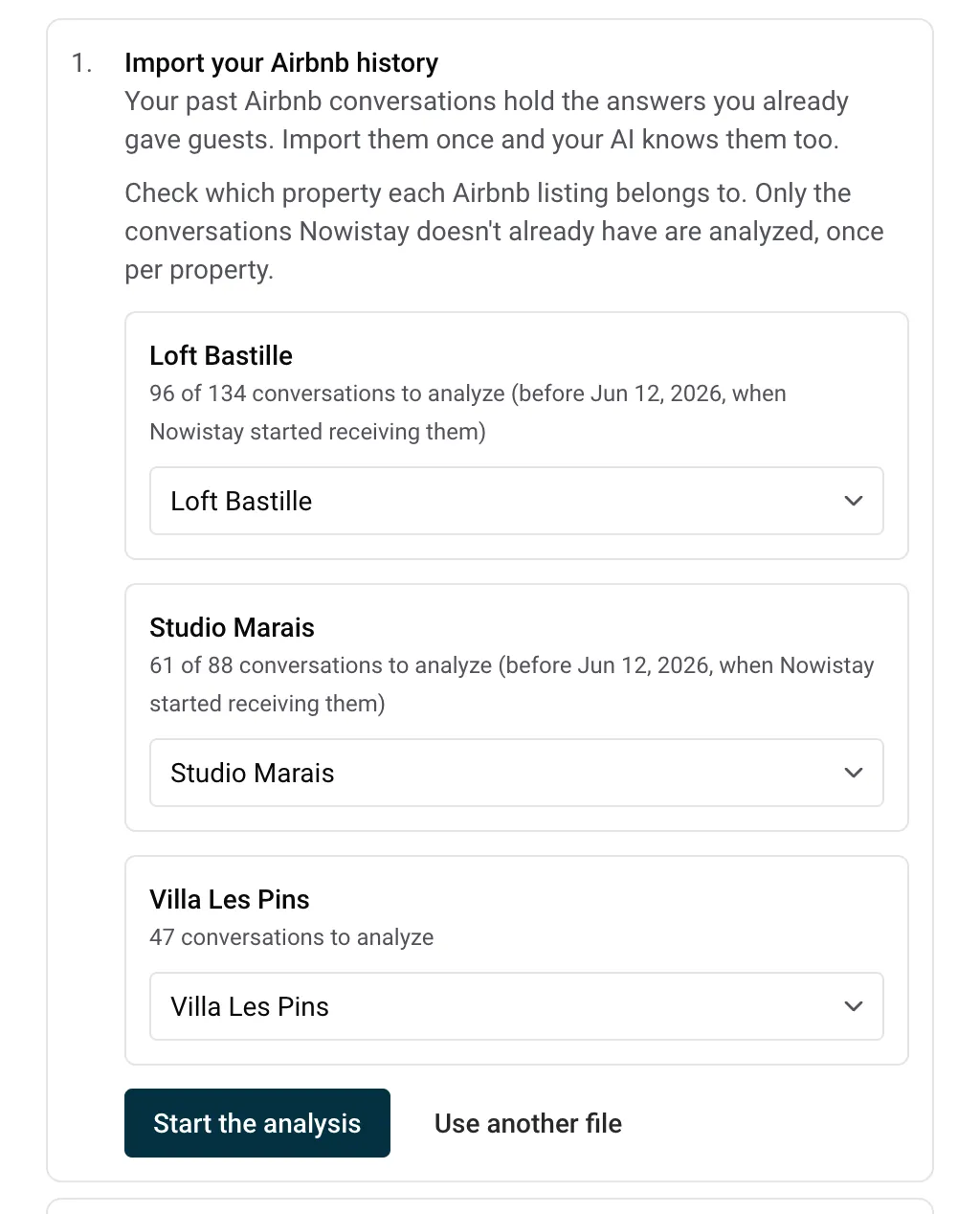
- Change the property if the match is wrong, or choose Skip this listing for a listing you no longer manage.
- Only the conversations Nowistay does not already have are analyzed, that is the ones from before your property started receiving its messages in Nowistay.
- The import runs once per property.
Click Start the analysis. You can close the panel: the analysis continues and the step shows its progress.
4. What is added to your knowledge base
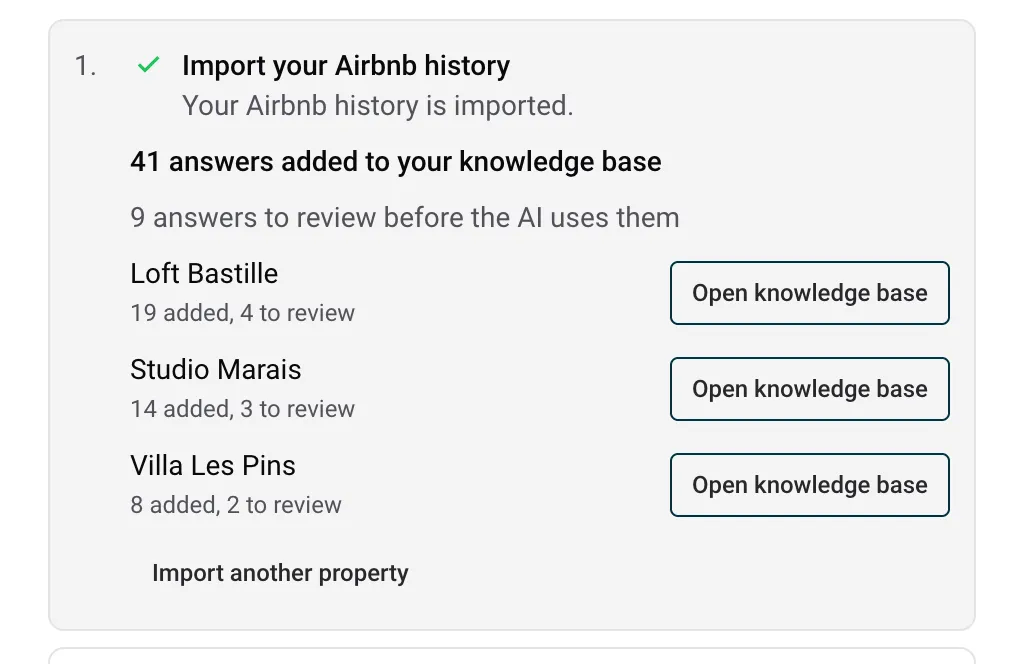
- Added directly: lasting facts about the property that you wrote yourself in the last 12 months. They appear in the property’s how-to-use-the-private-knowledge-base-of-the-ai-co-host with the AI badge, and the AI starts using them within about an hour.
- Waiting for your review (step 3): facts from conversations 12 to 24 months old, shown with their date so you can confirm they are still true, and anything containing a code, a phone number, an email address or a link.
- Left out: what your welcome guide or knowledge base already covers, one-off arrangements made for a single guest, conversations older than 24 months, and automatic messages, which are never used as a source.
Open knowledge base opens each property’s knowledge base, where you can edit or delete any entry.
Good to know
- A newer answer always wins: conversations are read from the most recent to the oldest, and an old answer never replaces what your guide or knowledge base says today.
- The text of your conversations is deleted as soon as each one is analyzed. Only the answers kept in your knowledge base remain.
- To import the history of a property added later, use Import another property and drop the same file again: properties already imported are left out.
Guides for hosts: read the blog.
Ready to Put Your Rental on Autopilot?