
Reply to your Airbnb and Booking.com reviews with AI
Updated
Replying to reviews shows future guests that you care, but writing a thoughtful answer after every stay takes time. Nowistay’s AI writes the reply for you, from the review itself, your conversation with the guest and your property’s information. You can use it in two ways:
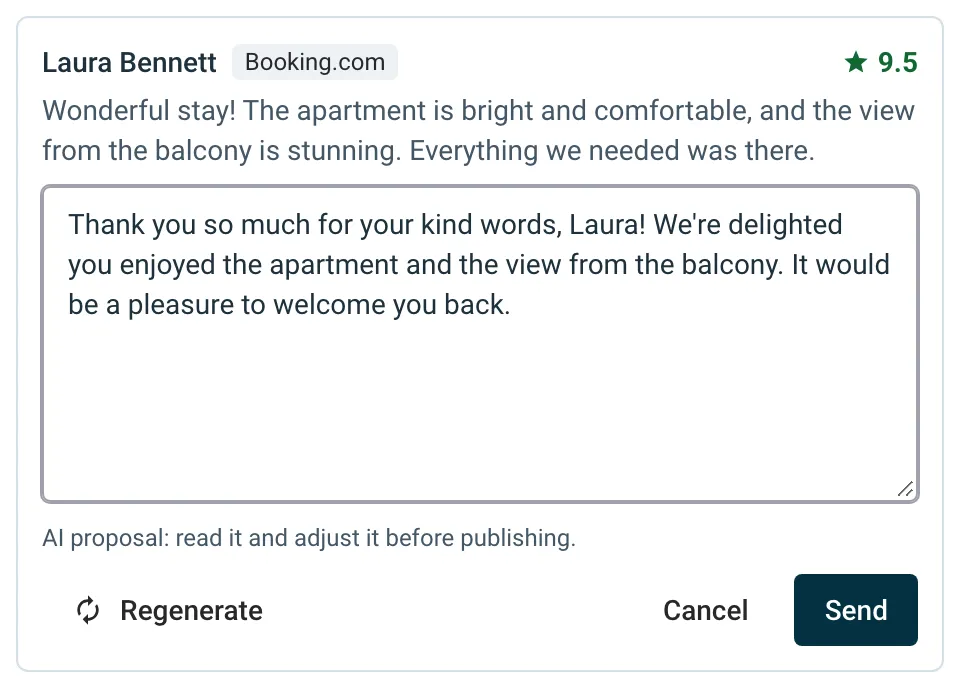
- AI proposal: click Reply on a review in Score & Reviews and the box opens with a reply ready to read, adjust and send. Nothing is posted until you confirm.
- Automatic replies: turn on the AI Review Replies automation and new Airbnb and Booking.com reviews are answered for you. Low ratings and sensitive reviews are never posted without you.
Who can use it
- The property must be connected to Nowistay PMS and have the AI Channel Manager subscription, like Score & Reviews. AI replies are included, at no extra cost.
- Automatic replies cover Airbnb and Booking.com reviews.
How the AI writes a reply
- As you, the host: in the language of the review, with the property’s Assistant tone (see how to set up your assistant). Plain text, with no signature and no mention of AI.
- From what it knows: the review and its rating, the stay’s conversation with the guest and your property’s information. For a proposal, it also reads your welcome guide.
- Calm and factual: it thanks the guest, acknowledges criticism without arguing and never blames the guest.
- No invented facts: it does not make up improvements, amenities or events, and never promises a refund, discount or compensation.
- No private data: no access codes, Wi-Fi passwords, address, phone numbers, emails, prices or payments, the guest’s last name, or anything discussed privately with the guest. Airbnb’s private feedback is never used for the public reply.
Get an AI proposal when you reply
- On the Properties page, click the … menu of the property and select Score & Reviews.
- Click Reply under a review. Writing a proposal… shows for a few seconds, then the proposal fills the box. You can start typing right away: the proposal never replaces text you have typed.
- Read the proposal and adjust it.
- For another version, click Regenerate. If you have already edited the text, Nowistay asks Replace your text? first.
- Click Send, then confirm in the Post this reply? window.
You can ask for up to 30 proposals per property per day. Past that, Proposal limit reached for today shows and you can still write your reply yourself.
A review that no longer accepts a reply (the time to reply is over, or it only has private feedback) has no Reply button.
Reply automatically to new reviews
Turn it on
- Open Automations from the left menu.
- Find AI Review Replies in the list.
- Click Select properties, tick the properties that should answer reviews automatically, then click Apply.
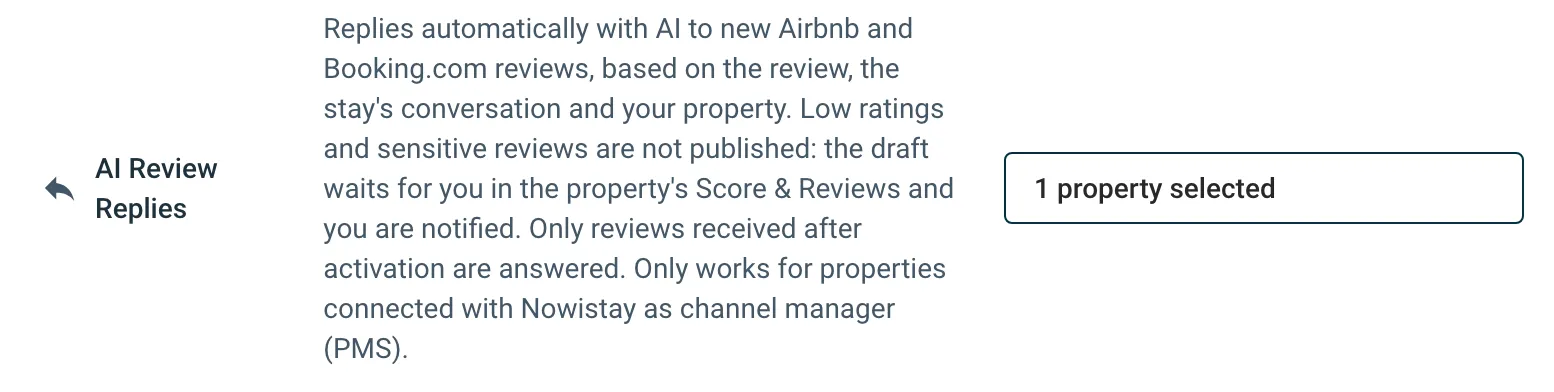
The automation is off until you select properties, and it has no settings: each reply uses the property’s Assistant tone.
Which reviews are answered
A review is answered automatically when all of these are true:
- It comes from Airbnb or Booking.com and has a public text.
- It arrived after you turned the automation on for the property. Older reviews are never answered automatically: use the AI proposal for them.
- It belongs to a reservation in Nowistay whose stay ended less than 45 days ago.
- It has no reply yet.
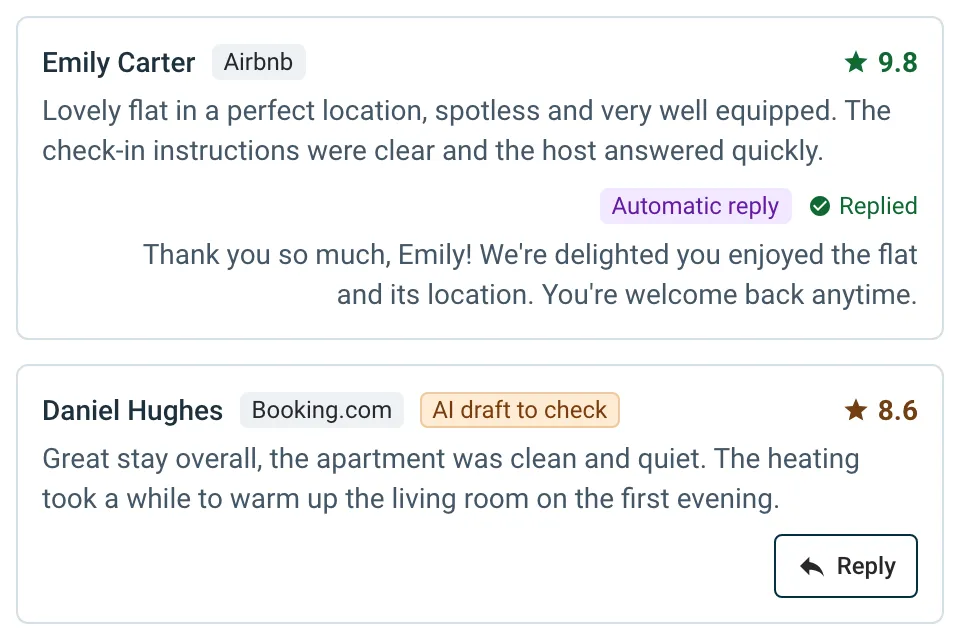
Once the reply is posted, the review shows Replied with your text and an Automatic reply tag.
Reviews that wait for you
The AI still writes a draft, but nothing is posted when:
- the rating is below 7.5 out of 10 (3 stars or less on Airbnb), or there is no rating;
- the guest was marked as unhappy during the stay (see guest mood) and the rating is below 9 out of 10;
- the review raises damage, safety, hygiene, money or a refund, an accusation, discrimination, legal action or anything else that calls for your decision;
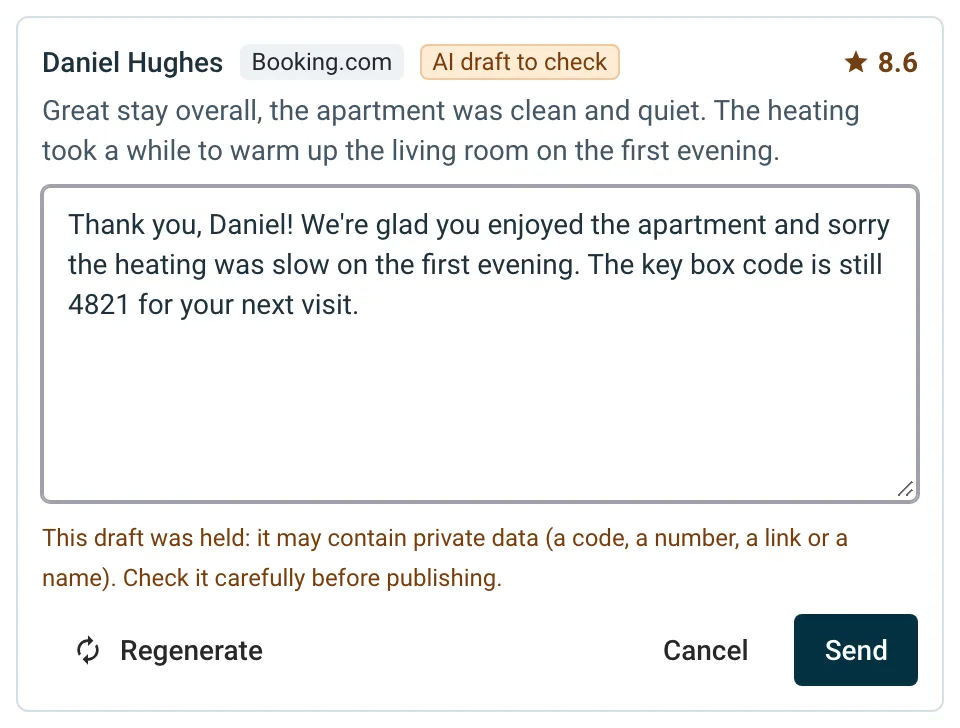
- the draft contains something that looks private (a code, a number, a link, an email or a name), or is unusually long.
You then get an email and a push notification, AI reply waiting for you, that opens the property’s Score & Reviews. The review shows AI draft to check:
- Click Reply: the saved draft opens in the box.
- Adjust it, or click Regenerate for a new proposal.
- Click Send, then confirm.
If the draft was held because it may contain private data, an orange warning under the box tells you so: check it carefully before you send it.
To stop these alerts, turn off AI review reply waiting in Notifications > My notifications.
When Airbnb reviews get their reply
Airbnb publishes a guest’s review once you have reviewed the guest too, or when the 14-day review period ends. A reply can only be written once the review text is visible, so on Airbnb automatic replies usually go out a few days after checkout. With Guest Review, your review of the guest is posted 5 days after checkout, so the guest’s review and your reply appear sooner.
Good to know
- Your replies come first. A review you have already answered, on the booking channel or in Nowistay, is skipped.
- A reply is final. The booking channel does not let anyone edit a reply once it is posted, which is why risky reviews wait for you.
- Turn it off any time. Remove the property from the automation; drafts that are waiting stay available in Score & Reviews.
- If something goes wrong, Nowistay tries again later. If the reply still cannot be written or posted, the review stays unanswered so you can reply yourself.
- Team members who cannot see bookings or messages get proposals written without the stay’s conversation.
- Other channels: reviews from Vrbo, Expedia or Agoda are not answered automatically.
Guides for hosts: read the blog.
Ready to Put Your Rental on Autopilot?