One of the most time-consuming tasks when managing a short-term rental (Airbnb, VRBO, Booking.com, etc.) is handling guest requests for early check-in or late check-out.
It happens all the time: a guest asks to arrive early, you check with your cleaning team, wait for their answer, then get back to the guest. That back-and-forth can take hours, and it happens for almost every booking.
With Nowistay’s AI co-host, the entire process is fully automated. The AI handles the guest conversation, contacts your cleaning team, processes their response, updates the booking, and even adjusts your Nuki smart lock code if you have one connected.
What you need before starting
To enable automated early check-in and late check-out handling, make sure you have completed these steps:
- Create a property: Follow this guide to add your property on Nowistay.
- Set your check-in and check-out times: Configure your standard arrival and departure times so the AI knows what is “early” or “late”.
- Connect the AI co-host: Initialize your AI assistant using either Direct Airbnb or through your channel manager.
- Sync your bookings: If you use a direct Airbnb or Booking.com connection, add your Airbnb iCal calendar URL to synchronize bookings.
- (Optional) Add a cleaning team member: Add your cleaner so the AI can contact them directly instead of you.
- (Optional) Connect a Nuki smart lock: Set up your Nuki integration to automatically update door code time restrictions when a schedule change is accepted.
That’s it for the setup. Once everything is in place, the automation works on its own.
How it works: step by step
Here is exactly what happens when a guest asks for an early check-in or late check-out:
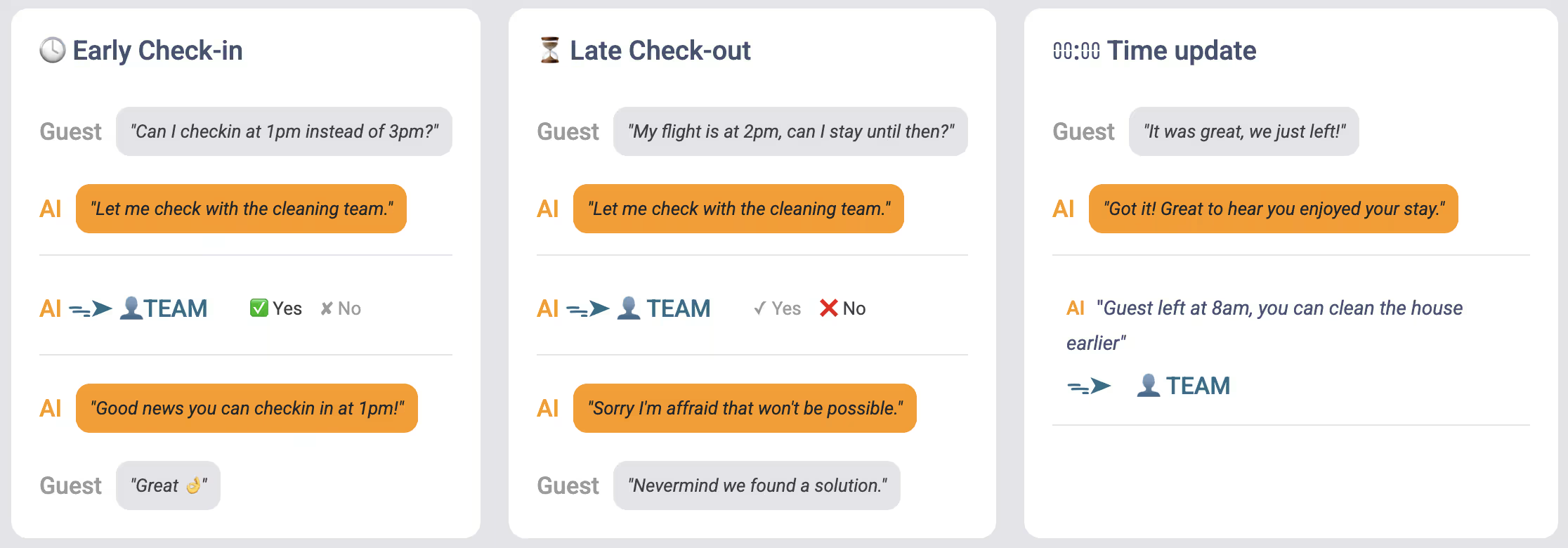
Step 1: The guest sends a message
The guest messages you through Airbnb (or another connected platform) asking something like:
- “Can I check in at 11am instead of 3pm?”
- “Would it be possible to check out at 2pm?”
The AI co-host detects that this is a schedule change request and handles it automatically.
Step 2: The AI tells the guest it will check
The AI immediately replies to the guest, letting them know it needs to verify with the cleaning team first. The guest receives a message like:
“Let me check with the team and I’ll get back to you as soon as possible.”
The AI identifies who to contact:
- If a cleaning team member is assigned to the cleaning mission for this booking → they receive the request.
- If no team member is assigned (or no cleaning mission exists) → you (the host) receive the request directly.
The request is sent via email and/or WhatsApp and includes:
- The guest’s name
- The property name
- The requested time (e.g., “11:00 AM”)
- The standard time (e.g., “3:00 PM”)
- The booking dates
- Two buttons: “Accept” and “Refuse”
Step 4: The team member (or you) responds
The cleaning team member (or you) can respond in two ways:
Option A: Accept
- Click the “Accept” button in the email or WhatsApp message.
- That’s it. The request is approved.
Option B: Refuse
- Click the “Refuse” button.
- A page opens where you can optionally propose an alternative time (e.g., “I can’t do 11am, but 12:30pm works”).
Step 5: What happens if nobody responds?
If the cleaning team member doesn’t respond within 30 minutes, the system automatically escalates the request to you (the host). You receive a notification saying the team member didn’t respond, and you can accept or refuse the request yourself.
The guest is not left waiting without an answer: the escalation ensures someone always decides.
Step 6: The AI gets back to the guest
Once a decision is made, the AI automatically sends the appropriate response to the guest:
If accepted:
- The AI confirms the new time to the guest: “Great news! Your early check-in at 11:00 AM has been confirmed.”
If refused without an alternative:
- The AI politely declines: “Unfortunately, we can’t accommodate an early check-in. Standard check-in is at 3:00 PM.”
If refused with an alternative time:
- The AI proposes the alternative: “We can’t do 11:00 AM, but we could offer 12:30 PM instead. Would that work for you?”
- If the guest accepts, the AI confirms and applies the new time.
- If the guest declines, standard times remain.
Prefer to handle these requests yourself?
By default, the AI asks your assigned cleaning team member first and only escalates to you if they do not reply within 30 minutes. If you would rather decide on early check-in and late check-out requests yourself, you can have them sent straight to you instead, skipping the cleaning team entirely.
To turn this on:
- Open Automations in your Nowistay dashboard.
- Find the AI Coordination automation and open its settings using the gear icon.
- Turn on “Send requests directly to me”.
Once enabled, every early check-in and late check-out request goes directly to you by email and/or WhatsApp, with the same Accept and Refuse buttons. Your cleaning team is never contacted for these requests, and there is no 30-minute timer because you are already the one deciding. You can turn the setting back off at any time to return to the default flow, where the assigned cleaner is asked first.
What gets updated automatically
When a schedule change is accepted (either the original request or an alternative time), the following updates happen automatically:
Booking schedule
- The negotiated check-in or check-out time is saved on the booking. This overrides the standard property times for this specific booking only.
Cleaning mission
- If the request was a late check-out and a cleaning mission is assigned, the cleaning mission start time is rescheduled to match the new departure time.
- The cleaning team member receives a notification about the updated schedule.
Nuki smart lock code
- If you have a Nuki smart lock connected, the system automatically updates the door code time restrictions to match the new schedule.
- For example, if a guest’s early check-in is approved at 11:00 AM instead of 3:00 PM, the Nuki code validity window is extended to start at 11:00 AM so the guest can enter at the agreed time.
- If no Nuki code exists yet for this booking but a lock is configured, a new code is generated automatically with the correct time window.
Summary
Here’s a quick overview of the complete flow:
- Guest asks for an early check-in or late check-out via messaging.
- AI replies that it will check with the team.
- Cleaning team member (or host) receives the request via email/WhatsApp.
- Team member responds: accept, refuse, or propose an alternative.
- If no response in 30 min → request escalates to the host.
- AI informs the guest of the decision.
- If accepted → booking time, cleaning schedule, and Nuki lock code are all updated automatically.
The entire process requires zero manual intervention from you, unless you want to be the one making the decision. It saves hours of back-and-forth and ensures your guests always get a fast response.
