The Upsells automation lets you sell paid extras to your guests: an early check-in, a late checkout, a breakfast basket, a bottle of champagne, an airport transfer, anything you want to offer during the stay. Your welcome guide displays the extras. The AI assistant presents them in conversations and guides guests to purchase them online. Payments go straight to the property's Stripe account, with no commission taken by Nowistay.
For early check-in and late checkout, the feature goes further than a simple sale: once the guest has paid, the booking's arrival or departure time is updated automatically, the cleaning mission is rescheduled, and your team is notified. Nothing to do manually.
Three things must be in place on each property where you want to sell extras:
If something is missing, the Upsells settings show exactly which properties are not eligible and why: "property(ies) not eligible (PMS, subscription or Stripe missing)".
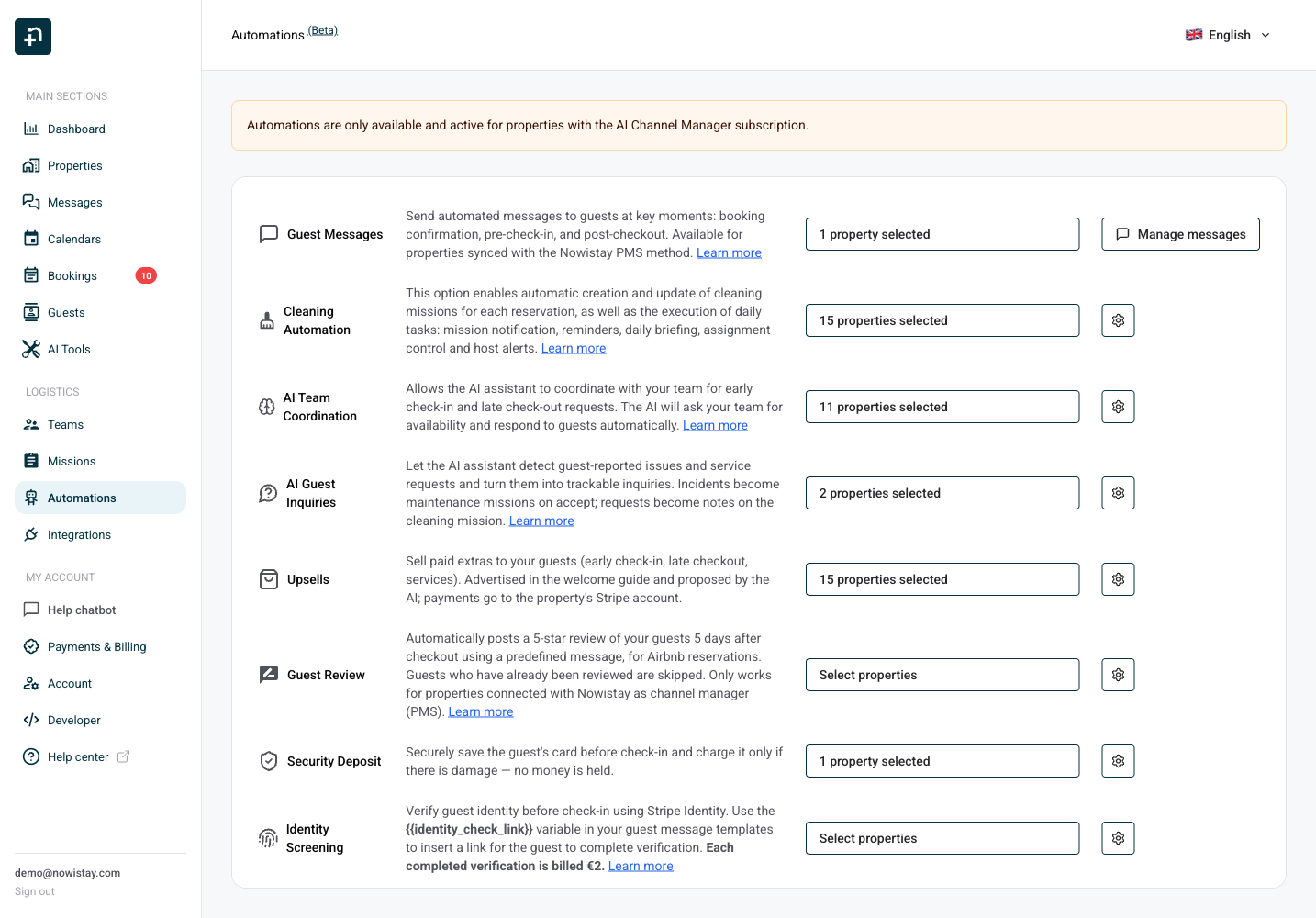
Open the Automations page from the side menu and find the Upsells row. Use the property selector to choose where the AI is allowed to propose extras, and click the gear icon to open the catalog.
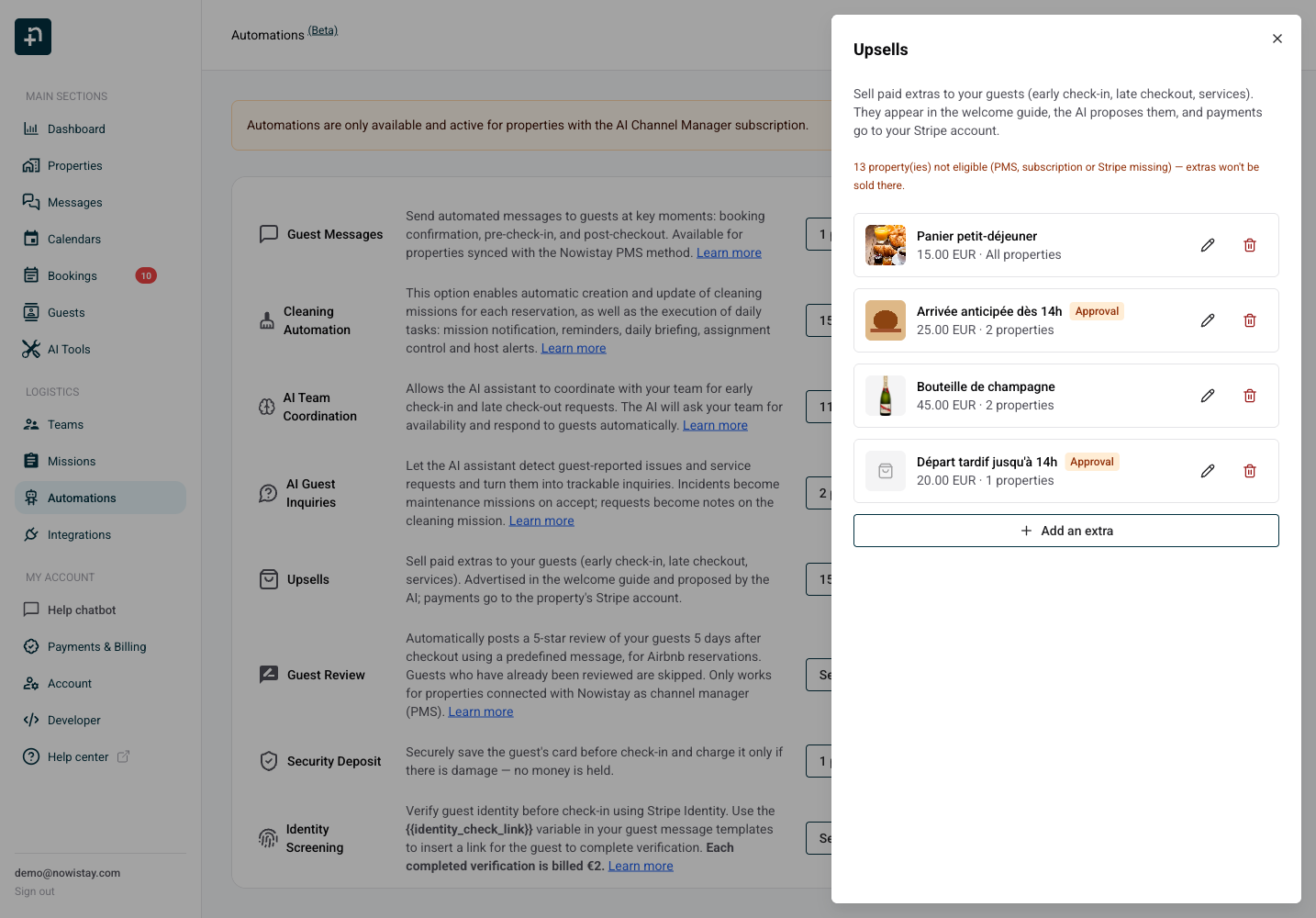
Click Add an extra. Each extra you create appears in the list with its photo, price and scope. You can edit or delete an extra at any time; an extra that has already been purchased is archived instead of deleted, so past purchases keep their history.
The editor below shows every setting of an extra. Here is what each one does:
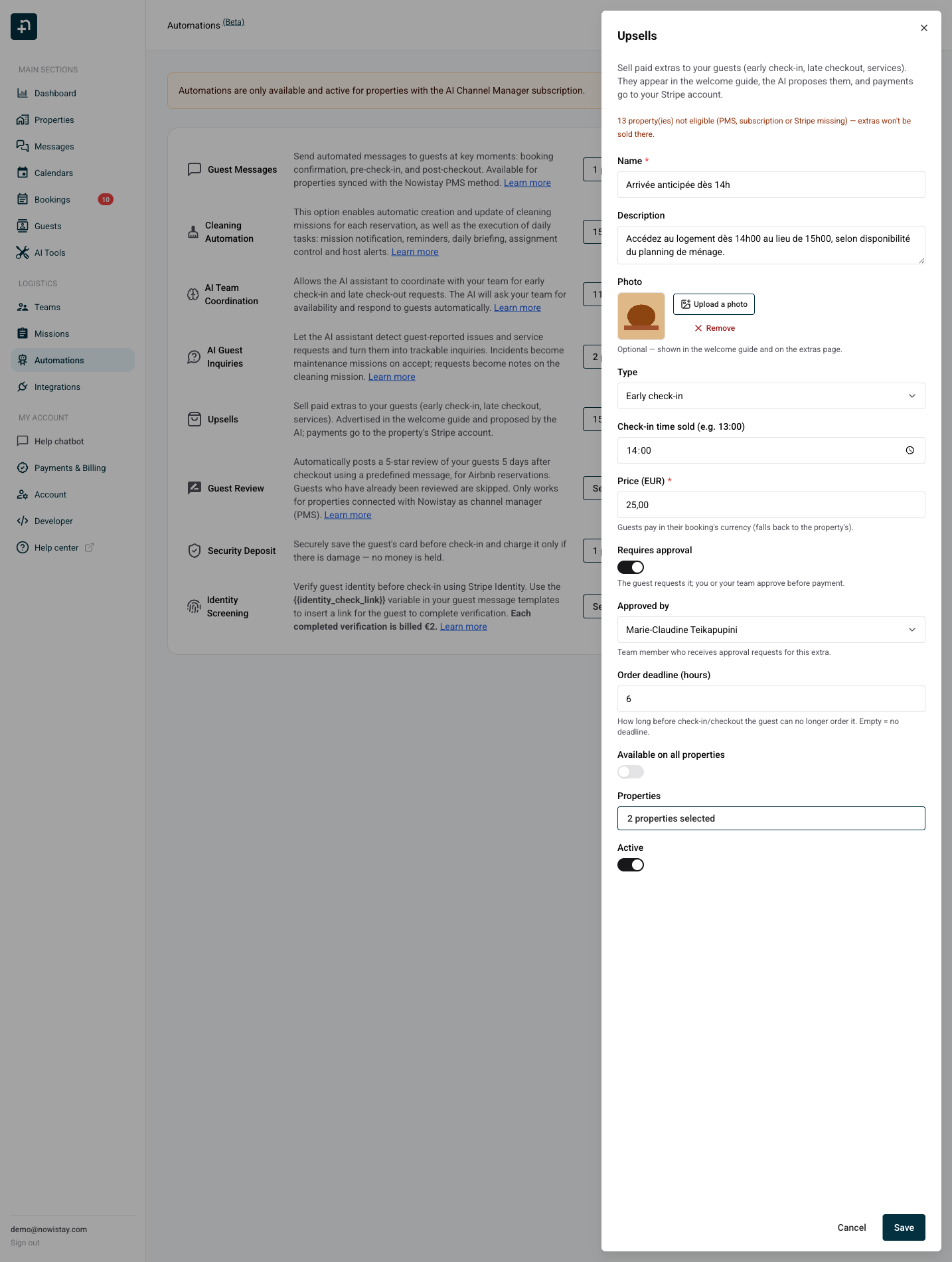
Write them in your own language. Nowistay translates them automatically into all the languages of the welcome guide, so each guest sees the extra in their own language.
Optional, but strongly recommended: the photo is shown in the welcome guide and on the guest's extras page. Images are optimized automatically for fast loading.
The amount the guest pays. The guest is always charged in the currency of their booking (with the property's currency as fallback), so the label shows you which currency applies.
Turn on Requires approval when you or your team must confirm availability before the guest can pay. As the setting says: "The guest requests it; you or your team approve before payment." This is the natural choice for early check-in and late checkout, which depend on the cleaning schedule.
Approved by chooses who receives the approval requests for this extra. Pick a specific team member, or leave Automatic (assigned cleaner, then you): the request then goes to the cleaner assigned to the booking, and to you if nobody is assigned.
How long before check-in (or before checkout, for a late checkout) the guest can still order. For example, a breakfast basket with a 24 hour deadline can no longer be ordered the morning of the arrival. Leave it empty for no deadline. The deadline is enforced everywhere: on the extras page, and by the AI, which knows an expired offer can no longer be sold and tells the guest why.
Sell the extra everywhere, or only on the properties you select. Only eligible properties can be selected.
Turn an extra off at any time without deleting it. Inactive extras disappear from the guide, the extras page and the AI's catalog.
Two building blocks are available in the welcome guide editor:
When a guest taps a purchase button, the guide opens their personal extras page. If they arrived through a personalized welcome guide link, their booking is already identified. Otherwise, they use the phone number on their reservation or their 6-digit access code. The voice option is not required to access or buy extras.
Guests who never opened the welcome guide before arriving can still discover your extras: print a QR code that opens the Boutique page directly and display it in the property, at the entrance, in the kitchen or next to the printed guide.
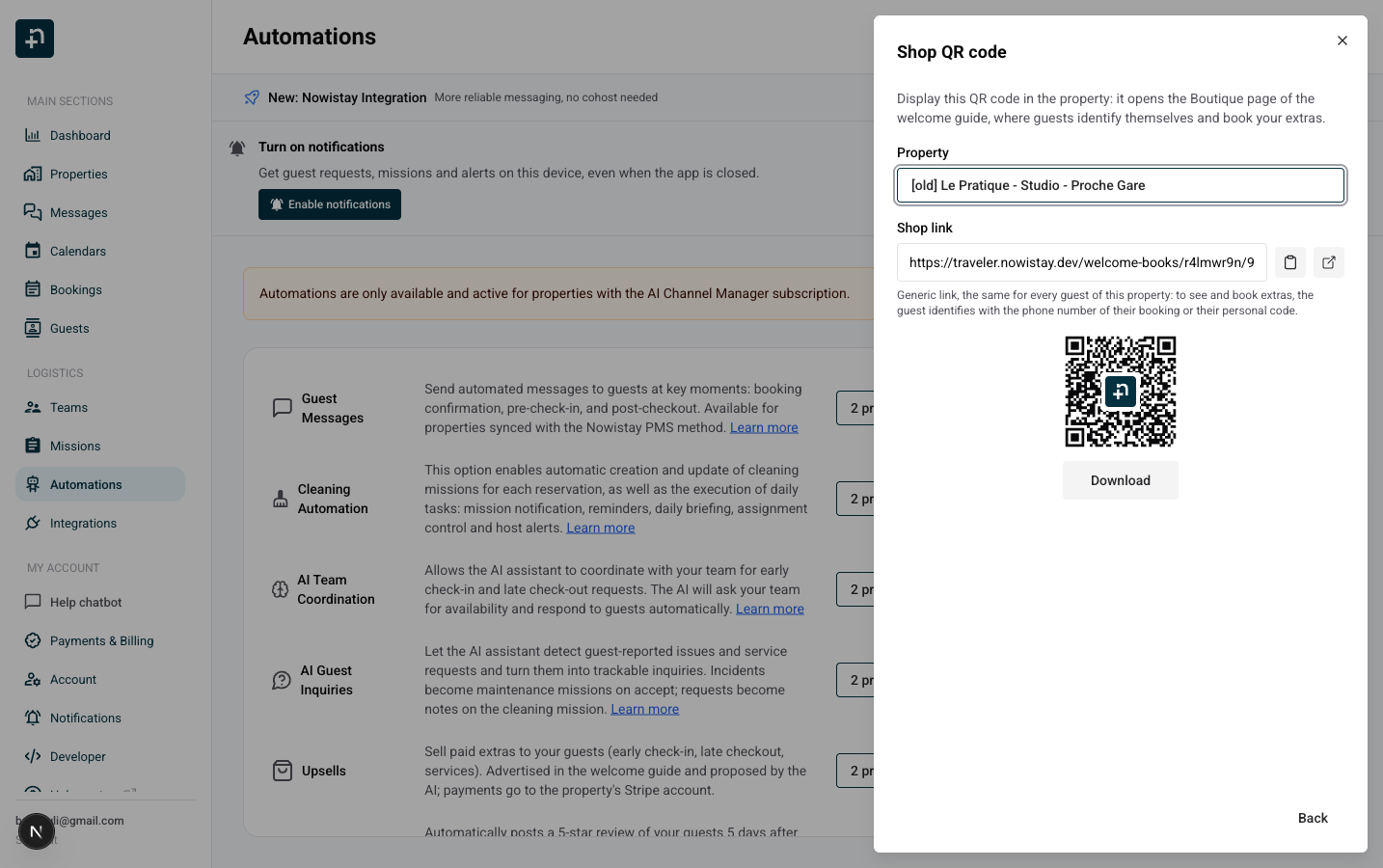
This link is generic: it is the same for every guest of the property and opens the Boutique page of the welcome guide, not a personal page. To see and book extras, the guest identifies with the phone number of their booking or their 6-digit code, as described above. The QR code stays valid as long as the Boutique page exists in the guide, so keep that page once you have printed the code.
Use {{welcome_guide_url}} in your automated guest messages. Nowistay personalizes this welcome guide link for each booking: it includes access to available extras and adds voice access only when the voice assistant is active. If you offer no extras, the same variable still opens the welcome guide. You do not need a separate link for each feature.
In your automated guest messages, click Insert variable and select {{welcome_guide_url}} under Property. The Extras group also contains:
{{upsells_access_code}}: the booking's 6-digit guest identification code, available without the voice option.{{upsells_link}}: a direct link to the guest's personal extras page. It remains available if you want to share that page separately.{{upsells_list}}: the extras currently available for this stay, with prices.{{upsell.<key>.name}}, {{upsell.<key>.price}} and {{upsell.<key>.link}}: select the actual extra in the picker to insert its name, price or link.Example: “You can browse and purchase our extras in the Boutique in your welcome guide: {{welcome_guide_url}}. If you open the general guide link and are asked to identify your booking, your code is {{upsells_access_code}}.”
In Airbnb, Booking.com, Vrbo and Expedia conversations, the AI explains the extra and its price, then directs the guest to the Boutique in their welcome guide to purchase. It does not send a direct extras or payment link in those conversations. On direct channels, such as email or WhatsApp, it can share the guest's personal extras link.
The AI assistant knows your catalog: exact names, prices, availability, deadlines, and what each guest has already bought. It never invents a price, and the catalog always wins over older text in your guide. On booking-platform channels, a typical early check-in conversation looks like this:
Guest: "Hi! Any chance we could check in around 2pm? Our train gets in early."
AI: "Early check-in from 2:00 PM is available as a paid option (25.00 EUR). I have sent the request to our team to check availability. As soon as it is approved, you can complete the purchase in the Boutique in your welcome guide. Once paid, your arrival time is updated automatically."
And for an instant extra:
Guest: "Could we order the breakfast basket for our stay?"
AI: "Of course! The breakfast basket is 15.00 EUR. You can order it in the Boutique in your welcome guide. It is delivered on arrival."
The AI also answers follow-up questions from the purchase history ("Is my early check-in confirmed?" "Yes, your early check-in at 2:00 PM is paid and confirmed."), and if an extra can no longer be ordered because its deadline has passed, it says so and falls back to a normal availability request to your team instead of selling something impossible.
When a paid offer is available for the requested schedule change, the AI routes the request through it, even if the guest simply announces "we will arrive at 11am". If the offer is no longer available, the AI follows the normal availability-request flow with your team.
When a guest requests an extra that requires approval, here is the full flow:
The request also appears on the team member's dashboard with a payment badge, so your team always sees whether an accepted extra has actually been paid before providing it. An approved extra that is never paid expires automatically and the approver is told not to provide it.
Each booking has its own personal extras page: the catalog with photos and prices, a purchase or request button per extra, and the history of their purchases with the granted times.
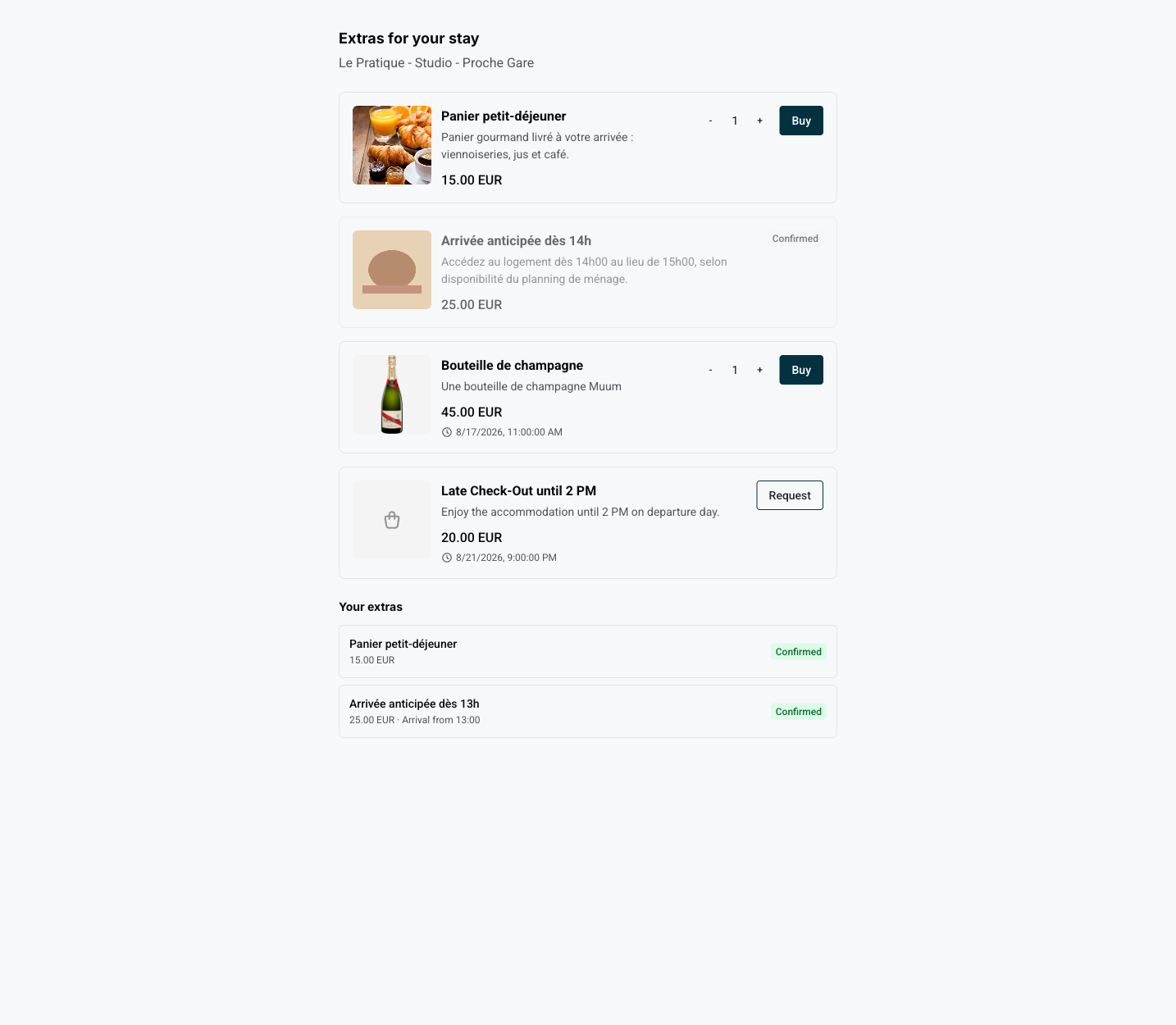
Payment happens on a secure checkout page. The money goes directly to the property's Stripe account; Nowistay takes no commission on your extras.
Open a reservation from Bookings, then find Guest access code in the Extras section. Use the copy icon to share it manually, or insert {{upsells_access_code}} in an automated message to send each guest their own code. Extras access works without the voice option. This identifies the booking; it is not a door or smart lock code.
The same section shows Personalized guide link: use its copy icon to share the complete welcome guide URL for this booking. When the Voice assistant section is available, it provides the same guide link. Voice access is included only when voice is active.
Every booking has an Extras section showing each purchase with its amount, granted time and status: Awaiting approval, Approved - awaiting payment, Paid, Declined, Expired, Cancelled or Refunded. You can approve or decline requests from here too, and Copy extras link gives you the guest's page to share manually whenever useful.
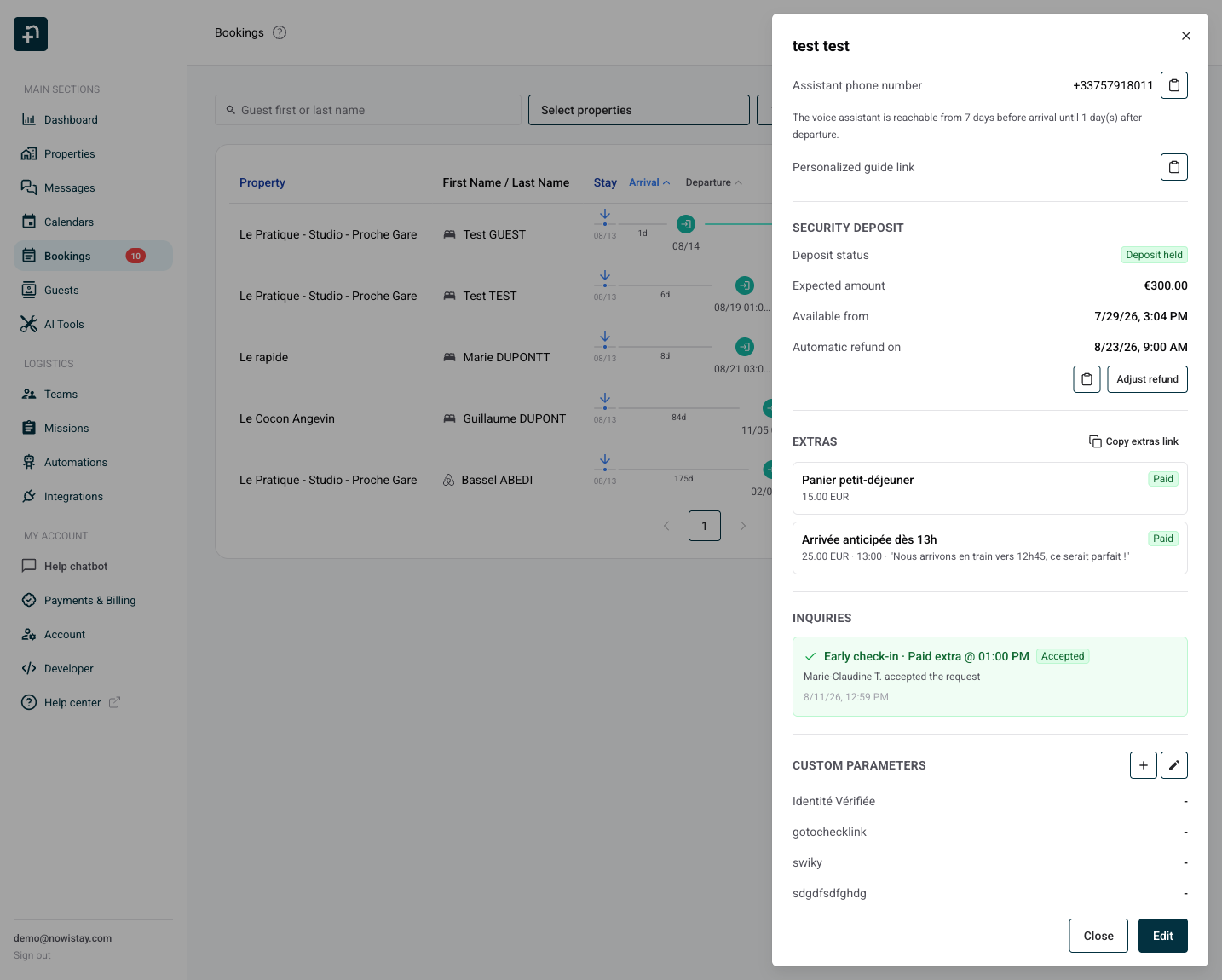
To refund an extra, issue the refund from your Stripe dashboard. Nowistay detects it automatically: the purchase is marked Refunded, and if it was an early check-in or late checkout, the booking time change is reverted.
